

Launch Control (for GT)
Launch control is a function that applies pre-torque in a stationary state to prepare for launch and delivers a punchy acceleration feel during takeoff.
Launch Control settings
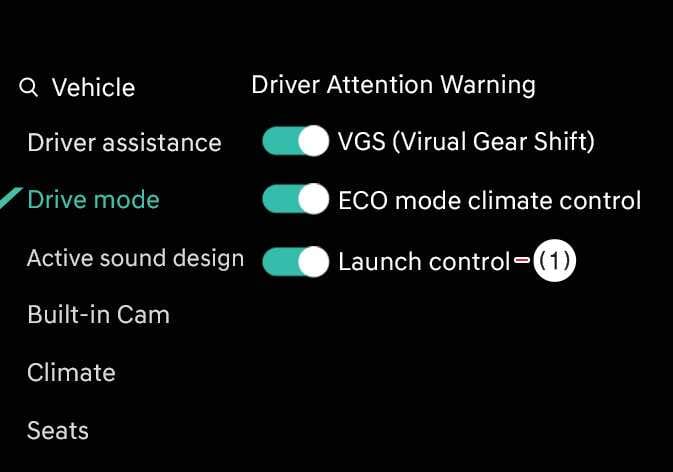 OOVQ016072L |
|
When the vehicle is in DRIVE READY state, tap from the infotainment system screen.
Launch Control operation
-
Step on the brake pedal over a certain level and then depress the accelerator pedal. Launch Control Ready warning message will appear on the instrument cluster once Launch Control is ready to activate.
-
Once Launch Control is ready, pre-torque will be automatically initiated.
-
Start driving after releasing the brake pedal within 8 seconds.
Operating conditions
Launch Control will be activated when all of the following conditions are satisfied:
-
Drive mode is in GT (MY DRIVE mode: SPORT+)
-
ESC is in SPORT or OFF
-
Vehicle is in D (Drive)
-
Steering wheel is in straight position
-
No warning indicator lights
-
Normal wheel speed
-
Normal motor temperature
-
High voltage battery condition is normal (not overheated, not too cold, and not low state of charge)
-
Launch Control will be canceled once you release the accelerator pedal.
-
If you want to use Launch Control again, you must cool down the vehicle for more than approximately 2 minutes. (If the ready state exceeds 8 seconds, it is considered as used.)
-
Launch control use is restricted when the vehicle’s Motor Control Unit (MCU) is overheated or when the battery is not in a normal condition (overheated, too cold, or low state of charge).
-
Launch control may also be restricted when driver assistance systems, including vehicle safety features, are operating.
-
Launch control is a launch assist feature and does not increase the vehicle’s actual acceleration performance.