Unlocking with the door handle
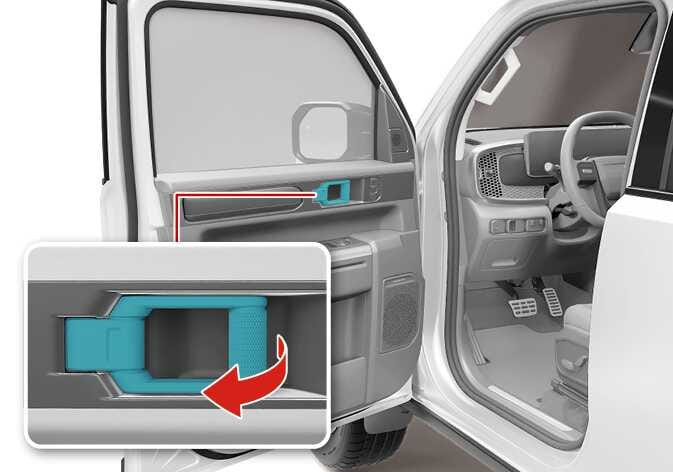
2026 Kia Tasman interior door handle operation image. The door handle is highlighted in cyan on the interior panel. A detailed inset view shows a red curved arrow indicating the pulling motion. Explains the function of pulling the handle to unlock and open the door from the inside.
N_TK25C018_1
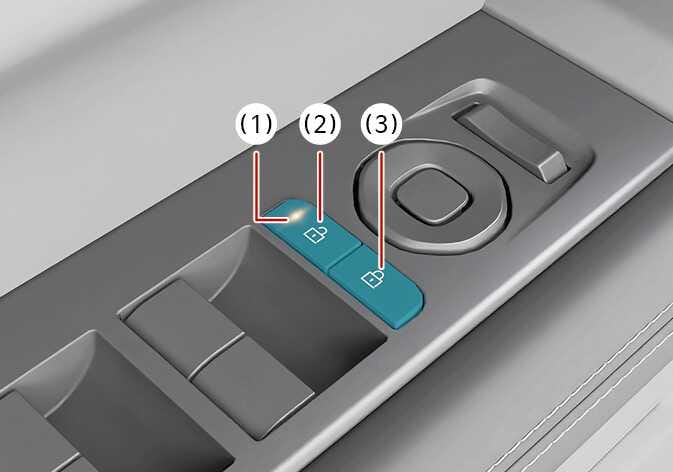
2026 Kia Tasman door lock buttons image. The door unlock button (2) and door lock button (3) are highlighted in teal on the door panel. The door indicator light (1) is located on the unlock button. Explains the layout and identification of the central door locking controls inside the vehicle.
N_TK25C019
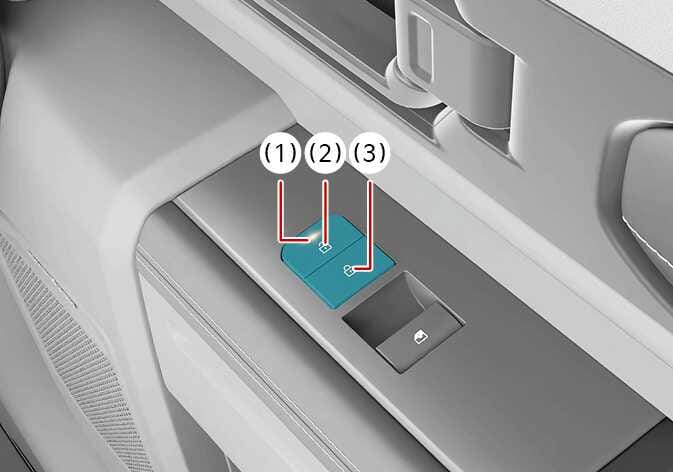
2026 Kia Tasman door lock switch image. The switches highlighted in teal on the armrest show the lock button (2) with a closed padlock icon and indicator light (1), and the unlock button (3) with an open padlock icon. This describes the interior door lock control layout.
N_TK25C020
  1. Door indicator light

  2. Door unlock button

  3. Door lock button

Simple operation

  • Pull the door handle once for the front door or twice for the rear door.

Operation

  • Pull the door handle.

    • Front door: Once (The door will be opened automatically)

    • Rear door: Twice