Forward Collision-Avoidance Assist (FCA) (Sensor Fusion)

Function

Details

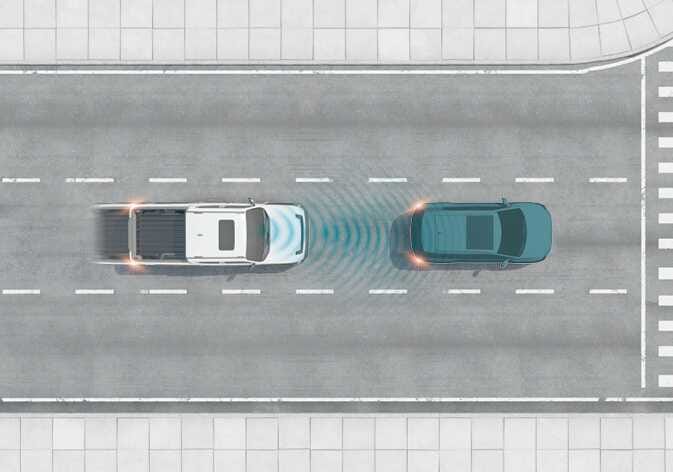
Figure 1. Basic function
2026 Kia Tasman Forward Collision-Avoidance Assist basic function image. A top-down view shows a white pickup truck emitting blue sensor waves from the front towards a vehicle ahead. Explains the function of detecting a vehicle to warn the driver or assist with braking to avoid a collision.
N_TK25E025

Forward Collision-Avoidance Assist detects a vehicle, a powered two-wheeler, a pedestrian, or a cyclist ahead on the road and may warn you of a possible collision with a warning message on the instrument cluster and a warning sound. Also, Forward Collision-Avoidance Assist may assist with braking your vehicle to help reduce collision speed or avoid a collision.

If Forward Collision-Avoidance Assist judges that avoiding a collision is difficult even by changing the driving lane due to surroundings of the vehicle, braking is assisted more earlier.: (if equipped)

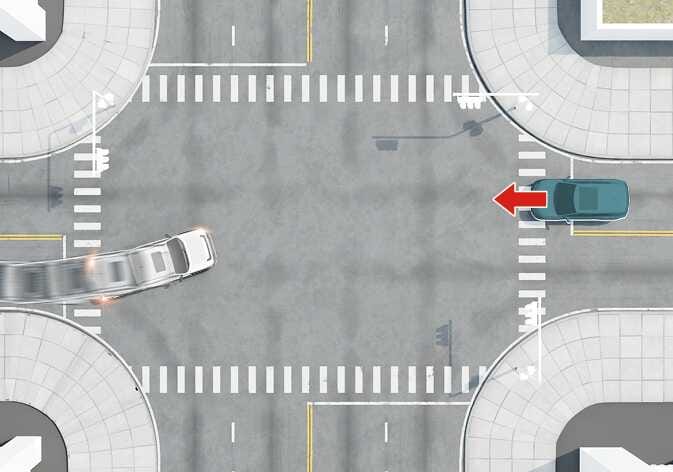
Figure 2. Junction Turning function
2026 Kia Tasman Junction Turning function image. A top-down view of an intersection shows a vehicle turning left, indicated by a red arrow, while an oncoming vehicle approaches. This explains the function that helps avoid a collision with an oncoming vehicle when turning left at a crossroad.
N_TK25E001_E

Junction Turning function can help avoid a collision with an oncoming vehicle, powered two-wheeler and cyclist in an adjacent lane when turning left (left-hand drive) or right (right-hand drive) at a crossroad with the turn signal on by applying emergency braking.

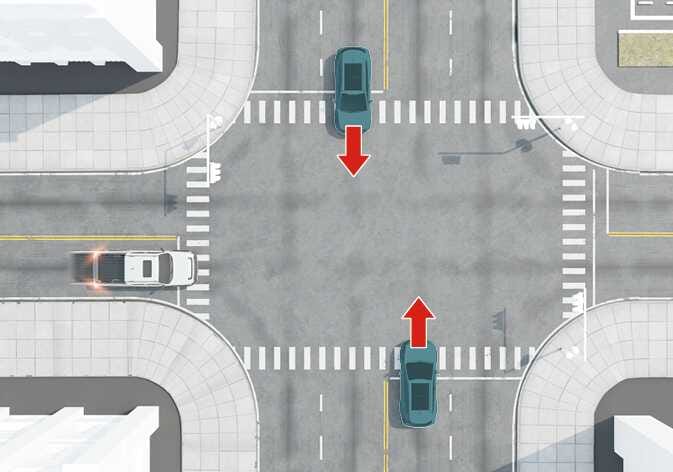
Figure 3. Junction Crossing function: (if equipped)
An image of the 2026 Kia Tasman Junction Crossing function. A top-down view shows the subject vehicle at the bottom and an oncoming vehicle at the top with red arrows pointing forward, and a white vehicle approaching from the left. This explains the function that helps avoid collisions with vehicles from the left or right when crossing an intersection.
N_TK25E027

Junction Crossing function will help avoid a collision with oncoming vehicles on the left or right side when crossing an intersection by applying emergency braking.

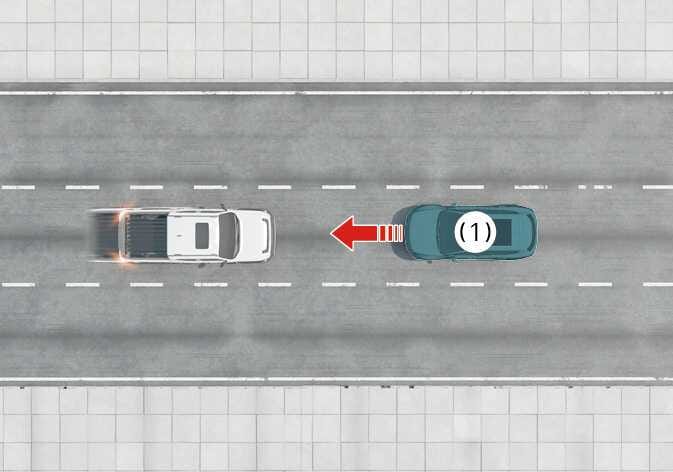
Figure 4. Direct Oncoming function
2026 Kia Tasman Forward Collision-Avoidance Assist Direct Oncoming function image. A top-down view shows a white pickup truck and a teal SUV labeled (1) approaching each other on a road. A red arrow points from the teal vehicle towards the white vehicle. The image explains the function that detects an oncoming vehicle (1) approaching from the opposite side to help reduce collision speed.
N_TK25E028
  1. Oncoming vehicle

Direct Oncoming function helps reduce the collision speed when a vehicle or powered two-wheeler approaching from the opposite side is detected.

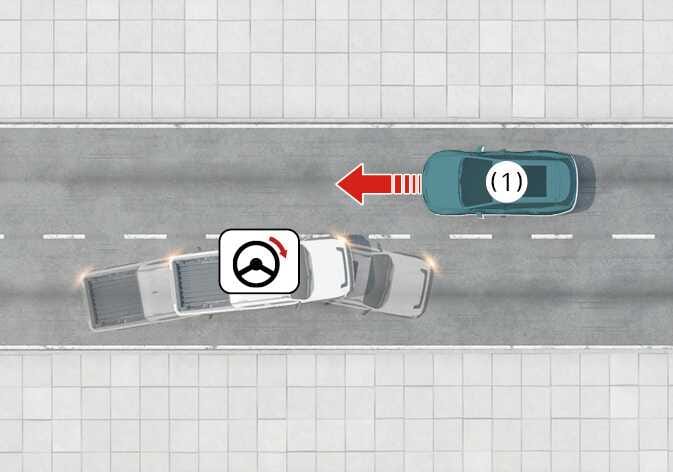
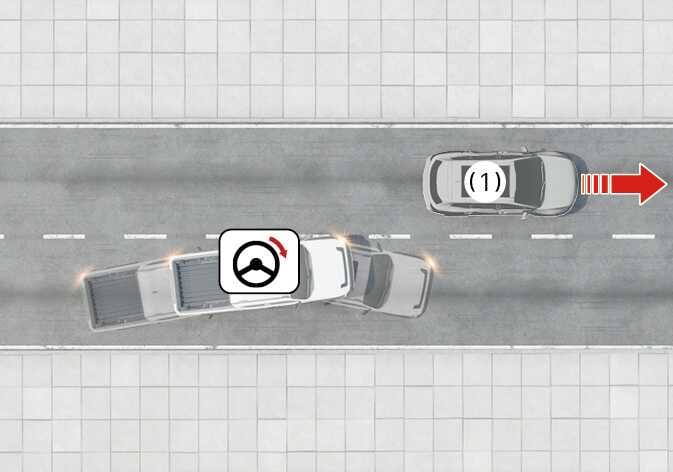
Figure 5. Lane-Change Oncoming function: (if equipped)
2026 Kia Tasman Forward Collision-Avoidance Assist image. A top-down view displays a white pickup truck and an oncoming vehicle labeled (1) in the adjacent lane. A red arrow indicates the oncoming vehicle's approach. A steering wheel icon with a red curved arrow above the truck signifies steering intervention. This explains the function of assisting with steering to help avoid a collision with an oncoming vehicle.
N_TK25E029_1
  1. Oncoming vehicle

Lane-Change Oncoming function will help avoid a collision with oncoming vehicles or powered two-wheelers when changing lanes by assisting the driver's steering.

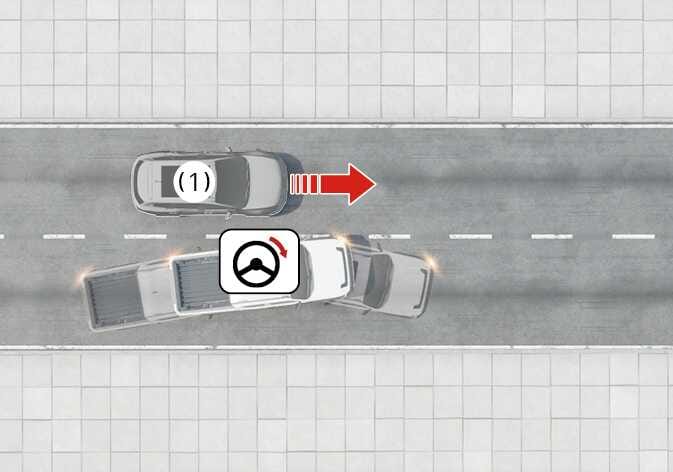
Figure 6. Lane-Change Side function: (if equipped)
2026 Kia Tasman Forward Collision-Avoidance Assist image. A top-down view shows the vehicle steering left to avoid an oncoming vehicle (1) approaching from the opposite direction. A steering wheel icon with a red curved arrow indicates the evasive maneuver. This explains the function assisting with steering to prevent a collision with an oncoming vehicle.
N_TK25E031_1
2026 Kia Tasman Forward Collision-Avoidance Assist image. A top-down view depicts a gray vehicle (1) in the adjacent lane with a red arrow indicating movement. The white subject vehicle steers towards it. A steering wheel icon with a curved red arrow indicates steering assist. This illustrates the Lane-Change Side function helping to avoid collisions with vehicles in the adjacent lane.
N_TK25E032_1
  1. Approaching car from side

Lane-Change Side function will help avoid a collision with vehicles or powered two-wheelers in the next lane when changing lanes by assisting the driver's steering.

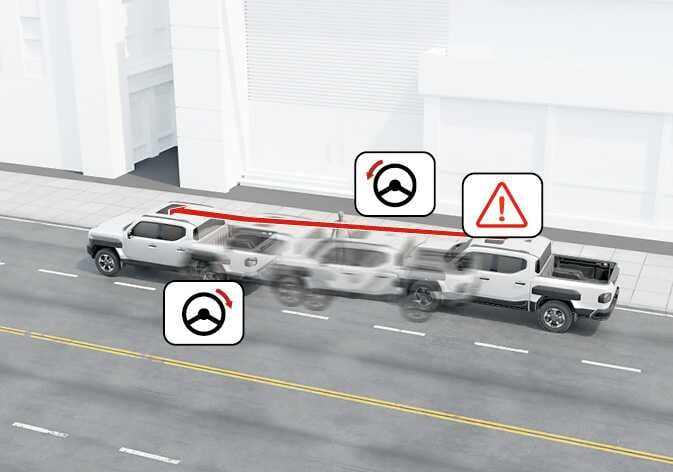
Figure 7. Evasive Steering Assist function: (if equipped)
2026 Kia Tasman Junction Turning function image. It shows the vehicle turning at a junction with ghosted outlines indicating emergency braking against an oncoming path marked by a red arrow line. Icons show steering wheels with red turn arrows and a warning triangle. This explains the function of applying emergency braking to avoid collisions when turning.
N_TK25E002_E
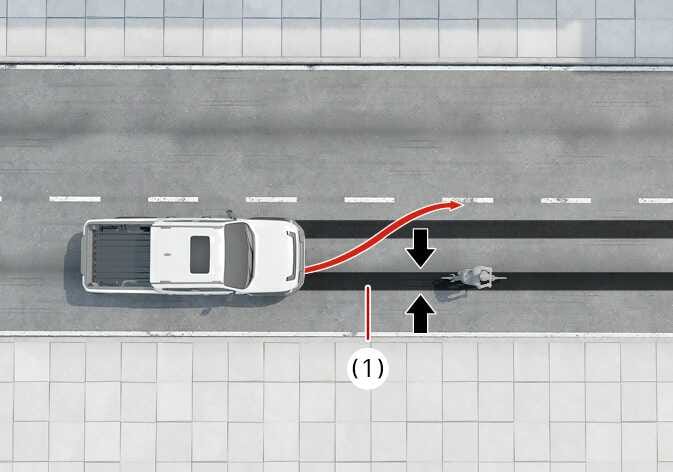
2026 Kia Tasman Forward Collision-Avoidance Assist image. A top-down view shows a white pickup truck steering to the left, indicated by a red curved arrow, to avoid a cyclist ahead. Black arrows (1) indicate the gap between the vehicle and the cyclist. This explains the function of assisting with steering to avoid a collision.
N_TK25E003_E
  • Driver steering assist

    If a possible collision with a vehicle ahead, pedestrians, cyclists and powered two-wheeler is detected and the driver steers to avoid the collision, Evasive Steering Assist will assist the driver in steering.

  • Evasive steering assist

    If there is high risk of collision with a vehicle, motorcyclist, pedestrian or cyclist in the evasive steering operating area, and the vehicle speed to operate emergency braking has exceeded, the steering is assisted to help prevent collision when there is space to avoid collision in the driving lane.

  1. Operating Area of Evasive Steering Assist function

Detecting sensor

Please refer to Detecting sensor(s) for the applicable sensors and their locations.

CAUTION

Take the following precautions to maintain optimal performance of the detecting sensor:

  • Never disassemble the detecting sensor or sensor assembly, or cause any damage to it.

  • If the detecting sensors have been replaced or repaired, have the vehicle inspected by a professional workshop. Kia recommends that you visit an authorized Kia dealer/service partner.

  • If the radar or around the radar experiences an impact, Forward Collision-Avoidance Assist may not operate properly even if a warning message is not displayed on the cluster. Kia recommends that you visit an authorized Kia dealer/service partner.

  • Never install any accessories or stickers on the windshield, or tint the windshield.

  • Pay extreme caution to keep the front view camera dry.

  • Never place any reflective objects (for example, white paper, mirror) over the instrument panel.

  • Do not place any objects near the windshield or install any accessories on the windshield. It can affect the performance of the defogging and defrosting function of the climate control system, which may prevent the Driver Assistance systems from operating.

  • Do not apply license plate frame or objects, such as a bumper sticker, film or a bumper guard, near the front radar cover.

  • Always keep the front radar and cover clean and free of dirt and debris.

    Use only a soft cloth to wash the vehicle. Do not spray pressurized water directly on the sensor or sensor cover.

  • The genuine Kia front radar, front corner radar and rear corner radar's sensor covers are parts with quality and performance ensured. If arbitrarily applying paint on or changing the covers, Forward Collision-Avoidance Assist may not function properly.

    Use only Kia Genuine Parts or those of an equivalent standard with proven quality and performance to repair or replace the radar sensor covers.

  • Do not arbitrarily attach objects (accessories, moldings, stickers, films, packaging materials, etc.) to the detection sensor or its surroundings, or paint the bumper.

  • The function may not work properly when the bumper has been replaced, or the surroundings of the front corner radar or rear corner radar has been damaged or paint has been applied.

  • If a trailer, carrier, etc. is installed, it may adversely affect the performance of Forward Collision-Avoidance Assist may not operate properly.