Changing gear
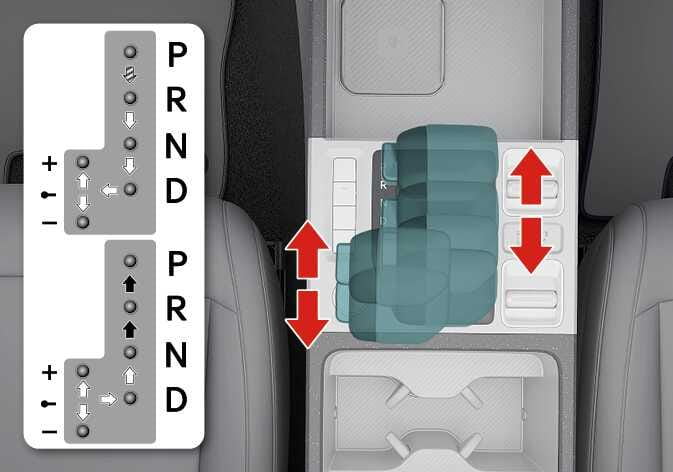
Figure 1. Mechanical type
2026 Kia Tasman mechanical gear shift lever image. The left diagram illustrates the shift pattern for P, R, N, D, and manual mode. The right side shows the shift lever highlighted in teal, with red arrows indicating the forward and backward operating directions. Explains the function of changing gears.
N_TK25D011_1
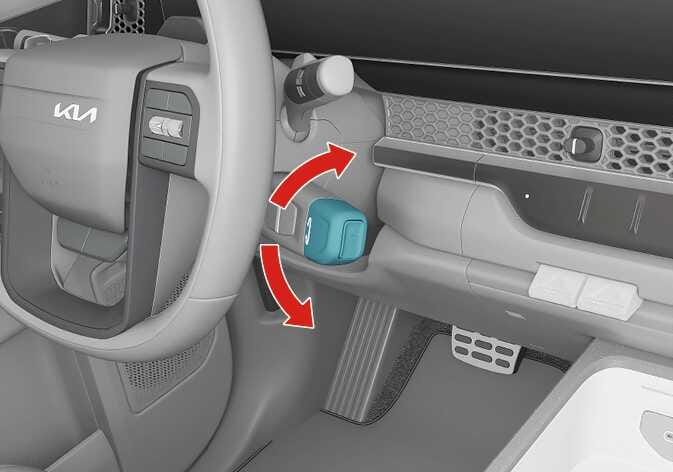
Figure 2. SBW type
2026 Kia Tasman SBW type shift lever image. The shift lever located on the right side of the steering column is highlighted in teal. Red curved arrows indicate the direction to rotate the lever up or down. Explains the function of changing gears by turning the lever.
N_TK25E003

Mechanical type

2026 Kia Tasman shift operation icon. A black arrow pointing to the right with diagonal white stripes. Indicates the requirement to depress the brake pedal and the lock release button when shifting. Depress the brake pedal and the lock release button when shifting. (Shift-lock system equipped)

2026 Kia Tasman shift unlock button symbol icon. It displays a solid black arrow pointing to the right. Explains the function indicating that the unlock button must be pressed when shifting gears. Press the unlock button when shifting.

2026 Kia Tasman free shifting arrow icon. A white arrow with a black outline points to the right. Explains the function that the shift lever can be shifted freely. The shift lever can be shifted freely.

SBW type: (if equipped)

  • Depress the brake pedal and turn the lever to the desired position.

  • Turn the lever slightly to shift to N (Neutral).