

Operating X-TREK
X-TREK is an assist function that helps the vehicle automatically drive at the driver's desired speed on off-road terrain.
It reduces the driver's fatigue from the pedal operation and helps them focus on steering wheel operation by automatically maintaining a low-speed driving state on off-road terrain without the need to operate the accelerator and/or brake pedal.
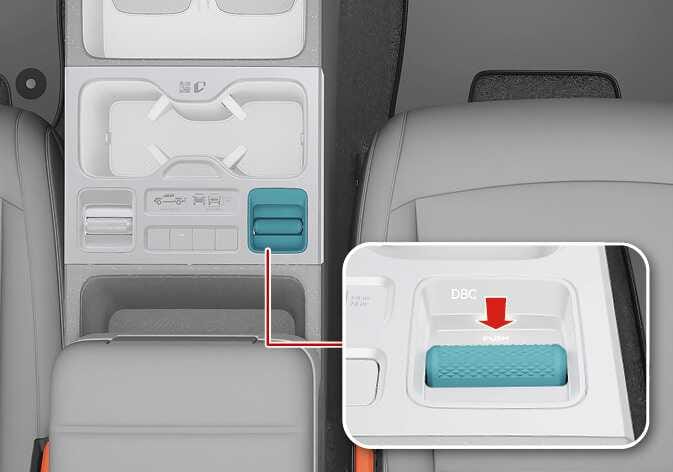 N_TK25E014_1 |
Operation
-
Stop the vehicle safely.
-
Shift to N (Neutral) with the brake applied.
-
Toggle the 4WD mode adjustment switch to change to 4L mode. Once the mode has shifted properly, ESC is automatically set to ESC OFF Level 1.
-
Shift to D (Drive) or R (Reverse).
-
Deactivate AUTO HOLD.
-
Press the X-TREK button to activate X-TREK.
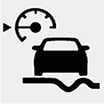
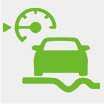
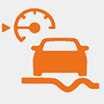
When X-TREK is activated, the X-TREK indicator light and the target vehicle speed gauge are displayed in 5 levels on the instrument cluster.
-
The vehicle's speed can be set to 5 levels between approximately 1~10 km/h (1~6 mph) depending on the terrain characteristics.
X-TREK indicator
|
Cluster indicator |
Colors and status |
Description |
|---|---|---|
|
|
Continuous grey light |
X-TREK operation is ready. The vehicle's speed level can be adjusted. |
|
|
Grey blinking |
The function is paused due to pressing the brake pedal. |
|
|
Continuous green light |
X-TREK function is activated. |
|
|
Green blinking |
The function is paused due to pressing the accelerator pedal. |
|
|
Orange blinking |
The function is paused due to pressing the accelerator pedal. The vehicle's speed is greater than approximately 15 km/h (9 mph). |
Operating conditions
-
When DRIVE MODE is NORMAL in 4L mode
-
When TERRAIN MODE is MUD/SAND/ROCK with 4L mode engaged
-
When the car is stopped due to the brake being applied
-
When the driver's seat belt is fastened
-
When the vehicle is in D (Drive) or R (Reverse)
-
When the vehicle's doors and hood are closed
-
When AUTO HOLD is deactivated
-
When EPB is deactivated
-
When SCC or MSLA and ISLA are deactivated
-
When the transmission temperature is at a normal level
-
When the trailer is disconnected (However, a Kia genuine Trailer Kit that can recognize whether a trailer is connected is used)
Non-operating conditions
-
When the manual shift is operated with the paddle shifter or manual shift mode while X-TREK is in operation
-
When AUTO HOLD is activated
-
When EPB is engaged
-
When X-TREK has been maintained for approximately 30 minutes or longer
-
When the vehicle is moving at 25 km/h (16 mph) or above
-
When the driver's door is open
-
When the vehicle is in N (Neutral) or P (Parking)
-
When MSLA and ISLA are activated
-
When the transmission is overheated
-
When ESC is set to ESC OFF Level 2
-
When the emergency brake function of FCA, RCCA, or PCA is operated
-
When driving in D (Drive) and the accelerator pedal is pressed, the gear is shifted to 2nd gear or higher
-
Never allow people who lack sufficient knowledge about this vehicle, infants, children, or pets to touch the X-TREK button.
-
Do not place any objects around the X-TREK button. They may operate it unintentionally.
-
Do not activate X-TREK when driving on normal roads.
-
Use the brake pedal or the parking brake when stopping the vehicle on a slope. Using X-TREK to keep the vehicle stationary may cause the brake system and transmission to overheat and become damaged.
-
When the X-TREK button is pressed, if the indicator light does not appear on the cluster or the indicator light on the button does not turn on, X-TREK is not in operation.
-
Some brake noise or vibration may occur while X-TREK is activated, which is normal.
-
When the brake is applied to reduce speed while X-TREK is activated, the rear brake light will turn on.
-
Under certain conditions, X-TREK may not keep the vehicle at a constant speed when driving on slopes.
-
It is the driver's responsibility to operate the vehicle. X-TREK may stop operating, fail to operate, or cause unnecessary operation depending on road conditions, surroundings, and driving conditions. Therefore, do not rely solely on X-TREK while driving. Always check your surroundings in case of a dangerous situation and drive safely.
-
The vehicle manufacturer is not responsible if the driver violates traffic laws or any accidents occur while X-TREK is activated.
-
Under certain conditions, X-TREK may not keep the vehicle at a constant speed when driving on slopes.
-
X-TREK may not operate properly in the following cases. Drive carefully.
-
When cargo has been loaded or the vehicle is towing a trailer or carrier
-
When driving on slippery roads (on snowy, icy, rainy, or muddy roads)
-
When driving on roads with a sharp slope
-
When non-genuine compartments are installed in the vehicle
-
-
The warning message may not be displayed or its warning sound may not play if another system's warning message or sound is already active.
-
If X-TREK malfunctions, a warning message will appear on the cluster. If the warning message appears repeatedly, Kia recommends visiting Kia service center/service partner.
-
X-TREK may not operate normally even when no warning messages are displayed or the warning light does not turn on.
-
Use X-TREK and refer to All wheel drive (AWD).
TOW mode cannot be activated when 4L mode is engaged.
