

Adjusting trailer brakes
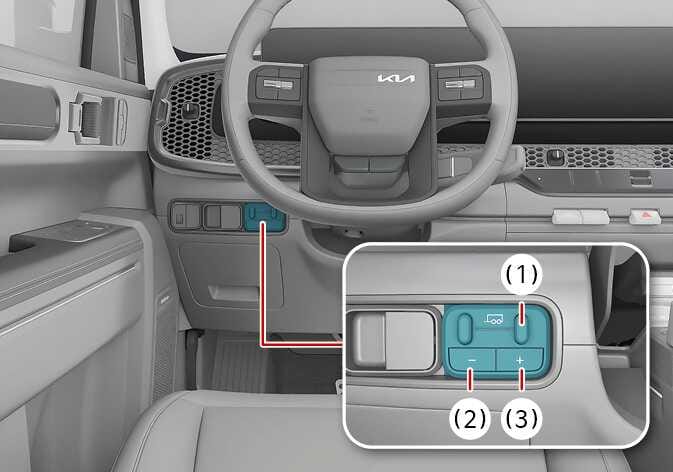 N_TK25E139_1 |
|
-
Verify whether the trailer brake is in good working condition, operating normally, and adjusted properly. Contact the trailer manufacturer if needed.
-
Connect the trailer to the vehicle and attach the cables according to the trailer manufacturer's guidelines.
-
Use the gain value adjustment to find your desired starting point. The gain setting of 6.0 is a starting point suitable for heavier weights. Adjust the gain setting as shown below whenever roads, weather, trailer, or vehicle loading conditions change.
-
In an environment where there are no vehicles, dry the trailer, tow the trailer on a firm level surface, and hold the trailer brake control lever firmly.
-
When the trailer wheels are locked (when the tires' skid noise occurs) due to driving at a speed of approximately 30~40 km/h (20~30 mph), reduce the gain setting. When the trailer wheels spin freely, raise the gain setting. Repeat steps 4 and 5 until the gain setting reaches the point just before the trailer wheels are locked. When towing a heavier trailer, the trailer wheels may not be locked even at 10, the maximum gain setting.
When the vehicle's speed is approximately 16 km/h (10 mph) or lower, the Integrated Trailer Brake Controller reduces the output to prevent sudden or harsh braking of the trailer and vehicle. This function can be used only when the brake is applied using the vehicle's brake pedal, not the trailer brake control lever.
-
You can increase or decrease the gain value to your desired starting point using the gain value adjustment button on the trailer profile setting screen within the infotainment system screen.
-
You can adjust the brake sensitivity depending on the gain value. Adjust it properly to your desired brake sensitivity.
-
The Integrated Trailer Brake Controller can adjust the gain value between 0-100% in 5% steps. The screen settings in the cluster and infotainment system will be displayed from 0 to 10 in 0.5 steps.
-
Adjusting the gain value is not related to the vehicle's brake system regardless of whether the trailer is connected.
-
-
Adjust the trailer brake properly using the Integrated Trailer Brake Controller and check all connections before towing the trailer. Not following these guidelines could lead to the loss of the vehicle control, physical injury, or death.
-
Use the trailer brake control lever only for adjusting the gain value while setting the trailer. Misusing it may cause instability in the trailer or towing vehicle.
-
The Integrated Trailer Brake Controller is installed upon delivery. There is no responsibility for the integrated trailer brake controller warranty or performance due to being misused or installed by the customer.
Depending on the gain setting, when braking under the Driver Assistance system functions, such as Forward Collision-Avoidance Assist (FCA) or Smart Cruise Control (SCC), deceleration may be insufficient, or vibration, noise, or smell may occur. Always drive safely and use caution.
-
Adjust the gain settings prior to using the Integrated Trailer Brake Controller for the first time.
-
The gain value should be set to prevent the trailer wheels from locking while using the brake and to ensure maximum trailer brake support is provided. Locked trailer wheels may cause instability in the trailer.
-
Select the trailer profile in the infotainment system to save the adjusted settings.
-
The Integrated Trailer Brake Controller supports the brake and lamp control function for trailers with American or Australian specifications, equipped with electronic or electronic hydraulic brakes. A trailer that has no brake or is equipped with inertia/surge brakes supports only the lamp control function, not the brake control function.
-
Do not attempt to remove the Integrated Trailer Brake Controller arbitrarily. The device may be damaged.
-
Do not operate the trailer brake control lever after connecting a trailer equipped with inertia or surge brakes or a trailer without brakes. The following message may appear on the cluster:Check the trailer connection.
-
The trailer manufacturer can diagnose the Integrated Trailer Brake Controller and accurately identify which errors occur in the trailer. The vehicle warranty does not cover any issues related to the trailer.
-
The vehicle's brake system and trailer brake system operate separately. Even changing the controller's gain setting does not affect the operation of the vehicle's brakes, regardless of whether the trailer is connected.
-
When pressing the vehicle's brake pedal or using the manual control lever, with proper electrical connection, all brake lamps on the trailer and vehicle will be turned on.
-
Turning off the engine deactivates the trailer brake controller output and turns off the trailer brake controller module. Turning on the engine activates the trailer brake controller module.
Using trailer brakes
-
Make sure to follow the trailer manufacturer's regulations when using trailer brakes. Be aware of the vehicle's brake system and drive safely. Never modify the brake system.
-
Make sure to select the proper trailer brake type in the infotainment system and adjust the gain value when connecting the trailer.
-
Connect the trailer for trailer braking and then operate the vehicle's brake pedal and Integrated Trailer Brake Controller.
-
When operating the Integrated Trailer Brake Controller, press the trailer brake control lever firmly for accurate braking.
-
Upon connecting the trailer, both the vehicle and trailer apply the brakes, and the stop lamps turn on when the brake pedal or the trailer brake control lever is operated.
Trailer sway control
-
When the trailer becomes unstable, the trailer sway control activates to prevent the vehicle and trailer from rolling over or causing an accident.
-
This function operates when trailer instability is detected.
-
This function minimizes oscillation when the trailer sways, but it does not prevent trailer instability.
