

Display and control
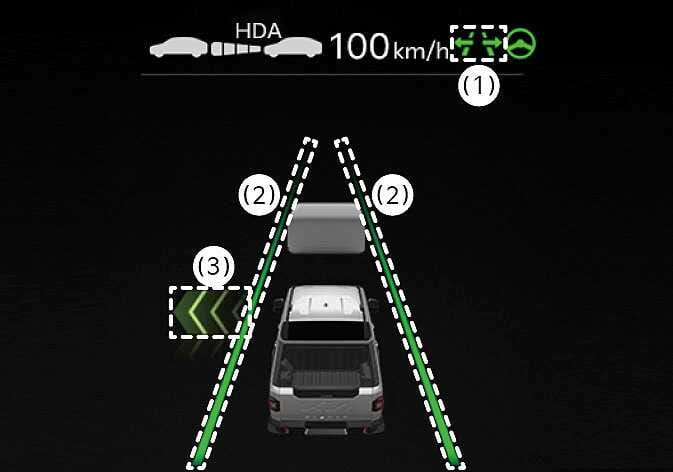
You can see the status of the Highway Lane Change Assist function operation in the Driving Assist view on the cluster. Refer to LCD display .
 N_TK25Z156 |
 N_TK25Z081_E |
Highway Lane Change Assist function will be displayed as below depending on the status of the function.
-
Highway Lane Change Assist indicator
-
Green (
 ) on: Operating state
 -
Gray (
) on: Standby state -
White (
) blink: Canceled state (display only a certain time)
-
-
Lane line
When the lane is displayed in green, Highway Lane Change Assist is available.
-
Green arrow and shade
The green arrow is displayed when a certain amount of time has passed after the function has started operating, and until the lane change has completed.
-
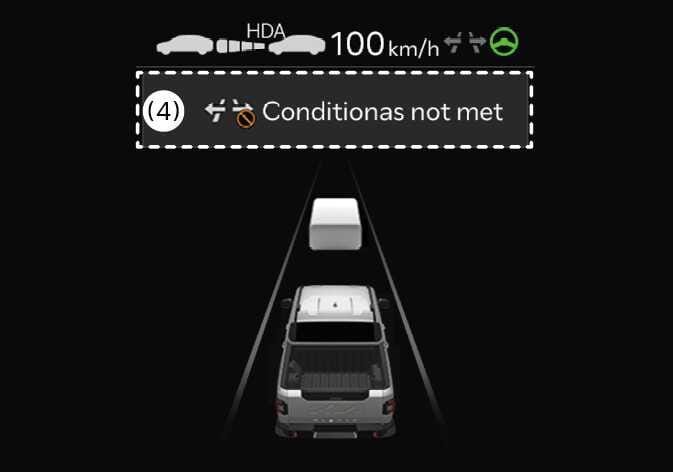
Message
-
Message is displayed when the function does not operate even though the turn signal lever is used.
-
Message is displayed when the function is canceled while operating.
-
Highway Lane Change Assist function will turn on when the following conditions are satisfied.
-
The Driving Assist button or Lane Driving Assist button is used to turn on Highway Driving Assist.
-
The OK button is pressed on the steering wheel while a message asking to use Highway Lane Change Assist is displayed on the cluster.
