

Rear view
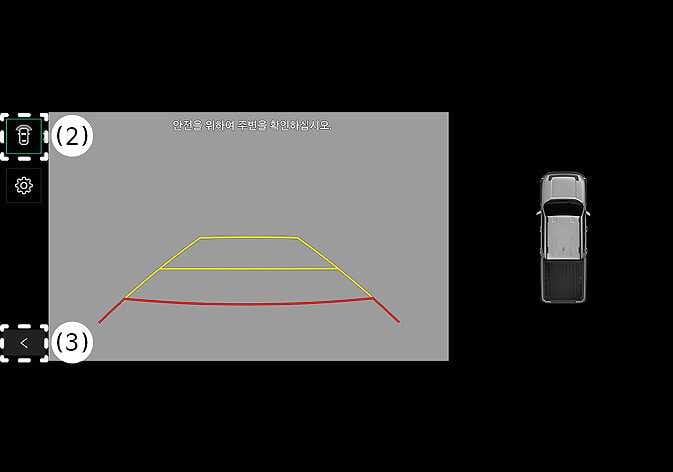 N_TK25Z012 |
(2) View switching button (3) Back button |
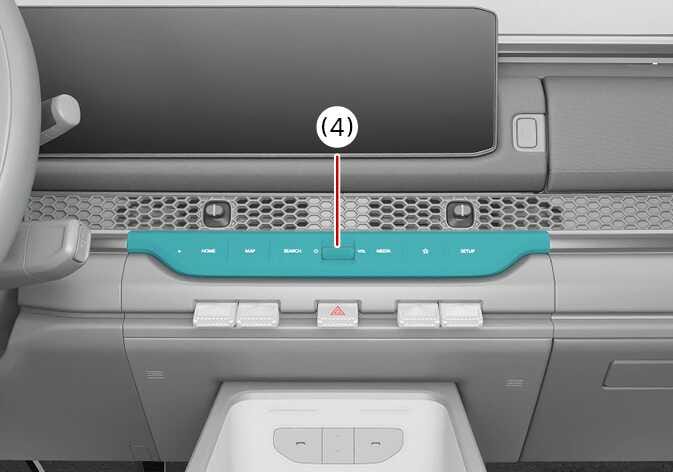 N_TK25E104 |
(4) Infotainment system power button |
Operating conditions
The Rear View function will turn on under the following conditions:
-
Shifting the gear to R (Reverse).
-
Pressing the Parking/View button (1) while P (Park), N (Neutral) or D (Drive) and the vehicle speed is slower than 10 km/h (6 mph)
Pressing the View switching button (2) with the Rear top view on the screen allows you to select rear top view, rear view, or rear wide view.
Off conditions
The Rear View while driving function will turn off under the following conditions while parking:
-
Shifting the gear to P (Park)
-
Pressing the Parking/View button (1)
-
Pressing the back button (3) on the rear monitor screen
-
Pressing the infotainment system operation button (4)
-
N (Neutral) or D (Drive) and the vehicle speed is faster than 10 km/h (6 mph)
Rear View will not turn off when the vehicle is in R (Reverse).
