Remote Smart Parking button

Parking/View button

Smart key

Digital key
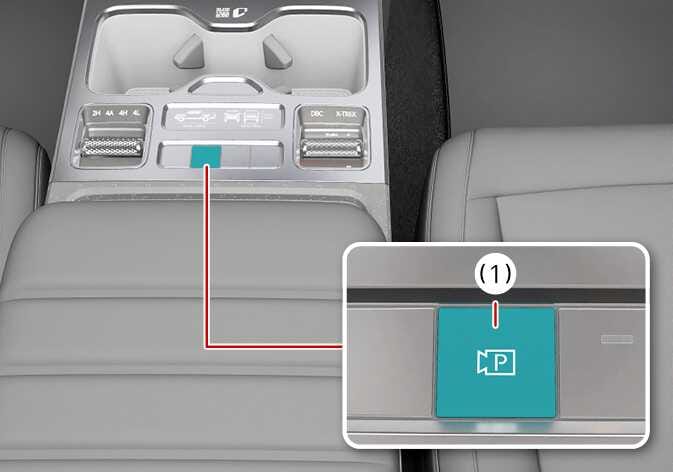
2026 Kia Tasman Parking/View button image. The center console is shown with the Parking/View button highlighted in teal. A detailed view labeled (1) depicts the button featuring a camera icon and the letter 'P'. Explains the location of the button used to activate the Remote Smart Parking Assist function.
N_TK25E102_1
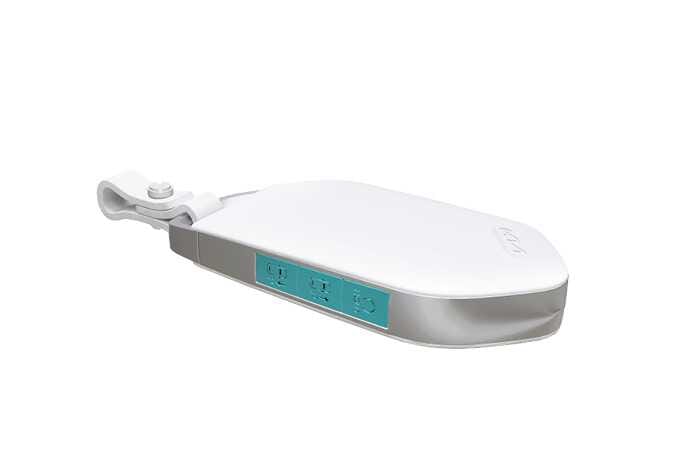
2026 Kia Tasman smart key image. The Remote Start, Forward Parking, and Reverse Parking buttons on the side of the key fob are highlighted in teal. Explains the location of the buttons used to operate the Remote Smart Parking Assist function.
N_CT25E122
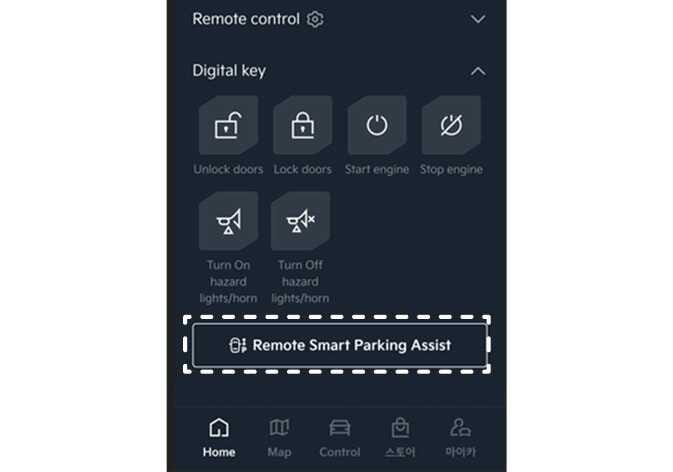
2026 Kia Tasman Digital Key interface image. The 'Remote Smart Parking Assist' button is highlighted with a dashed box on the smartphone screen. This describes the function of activating the Remote Smart Parking Assist via the digital key.
N_TK25E009_E

Location

Name

Symbol

Description

Inside vehicle

Parking/View button

2026 Kia Tasman Parking/View button icon. It displays a black video camera symbol with the letter 'P' inside. This explains the function of the button used to activate the Remote Smart Parking Assist system.

  • Press and hold the Parking/View button to turn on Remote Smart Parking Assist. Also, Forward/Reverse Parking Distance warning will automatically turn on.

    (However, functions may differ depending on the situations. Refer to each function's description for more details in the following pages.)

Smart key

Remote Start button

2026 Kia Tasman Remote Start button icon. A circular arrow symbol with the text HOLD underneath. Explains the function of starting the vehicle remotely.

  • Press the Remote button after the door is locked with the vehicle off to start the vehicle remotely.

  • Press the Remote Start button while Remote Operation function is operating to end function operation.

Forward button

2026 Kia Tasman Remote Smart Parking Assist Forward button icon. It features a top-down car silhouette with an upward arrow and the letter 'P'. This symbol represents the function to move the vehicle forward remotely.

  • When using the Remote Operation function, the vehicle moves in the direction of the button while the button is pressed.

Backward button

2026 Kia Tasman Remote Backward button icon. It features a top-down view of a car outline with a downward arrow pointing towards the letter 'P'. This symbol identifies the button on the Smart Key used to move the vehicle backward remotely.

Digital key: (if equipped)

Remote Smart Parking button

2026 Kia Tasman Remote Smart Parking Assist icon. The image displays a top-down car outline with a vertical double-headed arrow on the right and the letter 'P' below it. It represents the function for moving the vehicle forward or backward remotely.

  • When using Remote Forward/Backward, swipe the vehicle icon to move the vehicle in the desired direction