EV settings
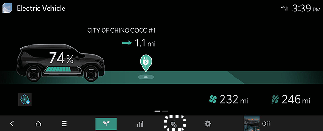
Select the icon on the screen. You can set the charging limit, charging current, battery conditioning mode and utility mode functions.
Charging limit
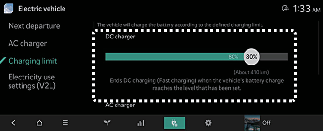
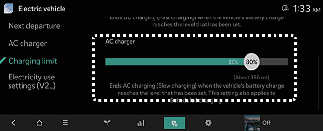
-
The target battery charge level can be selected when charged with AC charger or DC charger.
-
The charging level can be changed by 10%.
-
If the target battery charge level is lower than the high voltage battery charge level, the battery will not be charged.
Charging current
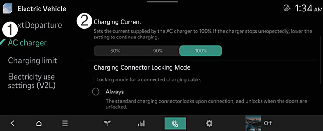
-
AC Charger
-
Charging current
-
You can adjust the charging current for an AC charger. Select an appropriate charging current.
-
If the charging process does not start or abruptly stops in the middle, reselect another proper current and retry charging the vehicle.
-
Charging time varies depending on which charging current is selected.
-
In the case of some AC high-capacity chargers (chargers with a current capacity greater than the current capacity that can be received by the vehicle), there may be no change in charging current even if the setting is changed.
Utility mode
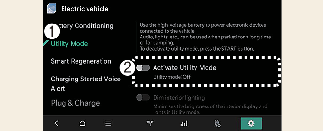
The high voltage battery is used instead of the 12V battery for operating the convenience features of the vehicle. When driving is not necessary such as while camping or when stopping the vehicle for an extended time, it is possible to use the electrical devices (audio, lights, air conditioner, heater, etc.) for long hours.
-
Utility Mode
-
Activate Utility Mode
System setting and activation
The driver can activate the Utility mode function when the following conditions are met:
-
The vehicle is in READY mode and the gear is shifted to P (Park).
-
The EPB (Electronic Parking Brake) is not malfunctioning.
-
Setup → Electric Vehicle → Utility Mode is selected on the infotainment system screen.
When the system is activated:
-
The READY indicator will turn off, and the UTIL indicator will appear on the cluster and the EPB is applied
-
All electric devices are usable but the vehicle cannot be driven.
-
The EPB can be canceled by pressing the EPB switch.
Gear cannot be shifted out of P (Park). If a shift attempt is made, Shifting conditions not met message will be displayed on the infotainment system screen.
The Utility mode can be deactivated by pressing the EV button to the off position. The function cannot be deactivated from the Electric Vehicle menu.
Battery conditioning mode (if equipped)
Battery conditioning mode is a feature that helps maintain charging performance at room temperature levels when the temperature of the high-voltage battery is high or low, such as in hot summers or cold winters.
Using energy from the battery to optimize the temperature during this process may reduce the driving range.
Sufficient time may be required to optimize battery temperature, and conditioning may not work to secure driving range if the charge is low.
-
Battery Conditioning
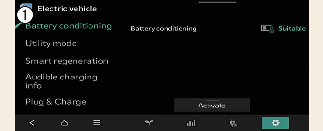
A switch on the infotainment screen shows the battery conditioning mode status and allows it to be turned on and off.

-
When setting a DC charging station as a waypoint or destination in the navigation system, optimizing the battery temperature during the journey can reduce charging time to room temperature depending on the required time.
-
When the battery conditioning mode is active, the State of Charge (SOC) gauge for high voltage battery changes to the battery conditioning mode indicator light.
-
The battery conditioning mode can be activated remotely using a smartphone app during vehicle parking. In this case, the battery conditioning mode will end either when the battery temperature reaches the appropriate range or after 30 minutes.
-
You can check the status of the battery temperature on the infotainment system screen.