
Manual Speed Limit Assist operation
Setting speed limit
-
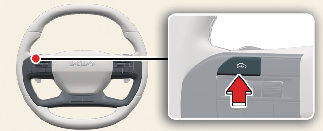
Press and hold Driving Assist button (
 ) at the desired speed. The Speed Limit indicator (
 ) will appear on the cluster.
-
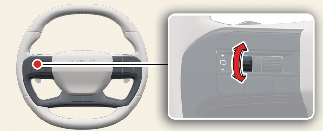
Push the (+) switch up and release it immediately. The set speed will increase by 1 mph (1 km/h) each time the switch is operated in this manner.
Push the (+) switch up or (-) switch down, and release it at the desired speed.
Push the (+) switch up or (-) switch down and hold it. The speed will increase or decrease to the nearest multiple of 5 (multiple of 10 in km/h) at first, and then increase or decrease by 6 mph (10 km/h).
-
The set speed limit will be displayed on the cluster.
If you would like to drive over the preset speed limit, depress the accelerator pedal.
The set speed limit will blink and chime will sound until you return the vehicle speed within the speed limit.

1. Set speed

To drive faster than the set speed limit, press the accelerator pedal until the vehicle accelerates.
Temporarily pausing Manual Speed Limit Assist
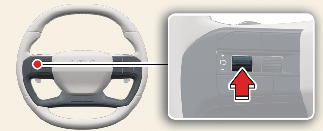
Press the ( ) button to temporarily pause the set speed limit. The set speed limit will turn off but the Speed Limit indicator () will stay on.
Resuming Manual Speed Limit Assist
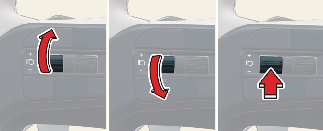
To resume Manual Speed Limit Assist after the function was paused, operate the (+) switch, (-) switch, () button.
If you push the (+) switch up or (–) switch down, vehicle speed will be set to the current speed on the cluster.
If you press the () button, vehicle speed will resume to the preset speed.
Turning off Manual Speed Limit Assist
Press the Driving Assist button () to turn Manual Speed Limit Assist off. The Speed Limit indicator () will go off.

Take the following precautions when using Manual Speed Limit Assist:
-
Always set the vehicle speed under the speed limit in your country.
-
Keep Manual Speed Limit Assist off when the function is not in use, to avoid inadvertently setting a speed. Check that the Speed Limit indicator (
) is off.
-
Manual Speed Limit Assist does not substitute for proper and safe driving. It is the responsibility of the driver to always drive safely and should always be aware of unexpected and sudden situations from occurring. Pay attention to the road conditions at all times.