
USB charger
The USB car charger allows drivers to charge their digital devices such as smartphones and, tablets.
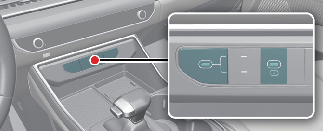
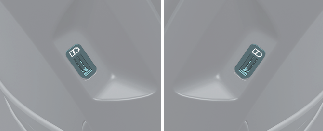

Plug the cable into the USB port, and charging will begin.
The USB car charger is available with either the ACC or the ignition on. Connect the USB port and digital devices with the engine running. Check the display screen of the device to check its charging process completion. Your smartphone or table PC could get hot while charging. This will not impact life or functions of the device. Charging can be stopped if the battery gets hot to a certain point of temperature that could affect the devices. Charging some digital devices is not available or requires special dedicated adapters if their charging methods don't comport with the USB car charger. Quick Charge 2.0 is available on a smartphone or the tablet equipped with fast charging capabilities. The list of applicable devices can be found at: (https://www.qualcomm.com/documents/quick-charge-device-list)
The smartphone or tablet without fast charging will charge at regular speed.

-
Power Delivery 3.0 is available on a smartphone or tablet equipped with fast charging capabilities. It is applicable to digital devices with USB C-type. Charging speed is determined according to the charging specification of the connected digital device.
-
Rated output: 9.0V/Max 3.0A

-
Use the USB car charger with the ignition on. Vehicle battery can be discharged.
-
Use the official USB cable of the manufacturer of the digital device to be charged.
-
Make sure that any foreign object, or liquid, does not contact the USB car charger. Water or foreign object can damage the USB charger.
-
Do not connect an electrical device that generates excessive electromagnetic noise to the USB car port. Noise can be heard or electronic devices can be interrupted while audio or AV is on.
-
If the charger is connected incorrectly, it can cause serious damage on the devices. Please note that damages due to incorrect usage are not covered by warranty service.