

Smart key
With a smart key, you can lock or unlock a door and even start the vehicle without inserting the key.
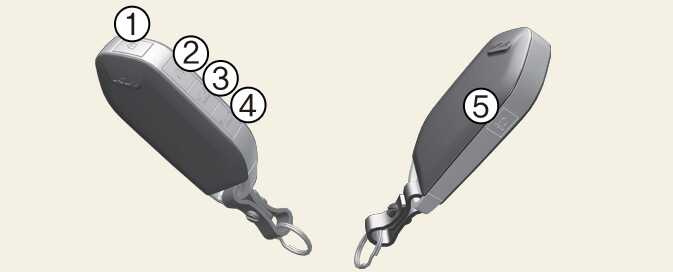
The smart key works when it is within approximately 33 feet (10 m) from the vehicle. Antennae within the vehicle sense when the smart key is within range.
Tinting the vehicle windows with film, especially metalized film, may interfere with the signal from the smart key, reducing its operating range.
Lock (1)
All doors can be locked if the lock button is pressed while the key is within range of the vehicle. Once all doors are closed, the hazard warning lights will blink and the chime will sound once to indicate that all doors are locked.
If the lock button is pressed again within 4 seconds, the hazard warning lights will blink and the chime will sound once to confirm that the door is locked.
If any door remains open or if the key is out of range, the hazard warning lights (and/or the chime) will not signal. If all doors are closed after the lock button is pressed, the hazard warning lights will blink once.
Unlock (2)
All doors will unlock if the unlock button is pressed once while the key is in range. The hazard warning lights will blink twice to indicate that all doors are unlocked.
Note that the doors will re-lock automatically unless you open any door within 30 seconds of pressing the unlock button.
If you attempt to lock or unlock the door by pressing the door lock/unlock button under any of the following conditions, the door will not be locked or unlocked.
-
When you want to lock or unlock the door in the ACC or ON state.
-
When you want to lock a door in a car with one or more doors open.
Depending on the vehicle, the driver can activate or deactivate the 2-press unlock setting function. For detailed information, refer to the separately supplied infotainment system manual.
-
Tinting the vehicle windows with film, especially metalized film, may interfere with receiving frequency transmitted by the smart key, reducing its operating range.
-
If the smart key is inoperative due to exposure to water or liquids, it will not be covered by your manufacturer's vehicle warranty.
Power liftgate unlock, Power liftgate open/close (3): (if equipped)
The power liftgate is unlocked or opened (if equipped) if the button is pressed for more than 1 second.
When the power liftgate is opened, press and hold the power liftgate open/close button to close the liftgate. If you release the button while the liftgate is closing, power liftgate operation will stop with a warning sound for 5 seconds.
Panic alarm (4)
The horn sounds and the hazard warning lights blink for about 30 seconds if this button is pressed for more than 0.5 seconds. To stop the horn and lights, press any button on the transmitter.
Remote start (5)
You can start the vehicle using the remote start button (5) of the smart key.
To start the vehicle remotely:
-
Lock the doors by pressing the door lock button (1) within 33 ft (10 m) of the vehicle.
-
Within 4 seconds after locking the doors, press the remote start button for over 2 seconds. The hazard lights will blink 3 times when the engine is started remotely.
Press the remote start button (5) once to turn off the vehicle.
If no further action for operating/driving the vehicle is taken, the vehicle will be turned off 10 minutes after starting the vehicle remotely.
While remote starting, the hazard warning lights blink 3 times. If you want to stop the vehicle, press the Remote Start button (5) again.
Start while inside the vehicle
You can start the vehicle while insist your Kia without inserting the key.
For more information, refer to ENGINE START/STOP button position.