

How to delete Digital Key (Smart Phone)
Turn the vehicle on with the smart key and make sure to keep the smart key inside the vehicle during the digital key (smart phone) deleting process.
-
To Delete All Digital Keys
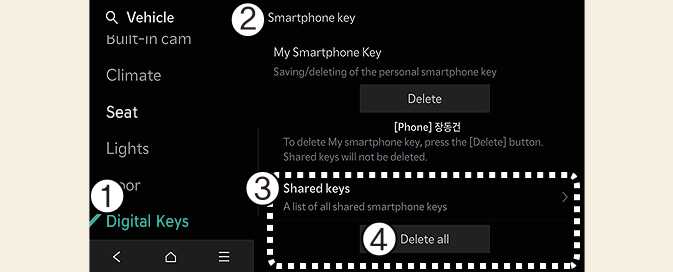 OMV033148N
-
Select Digital Keys
-
Select Smartphone key
-
Select Shared Keys
-
Select Delete all
With the vehicle on, touch Setup→ Vehicle → Digital Keys → Smartphone key → Delete all on the infotainment system.
-
The owner’s key and the shared user’s will be deleted.
-
If there is no registered key, the menu cannot be selected.
-
-
To Delete One Digital Key
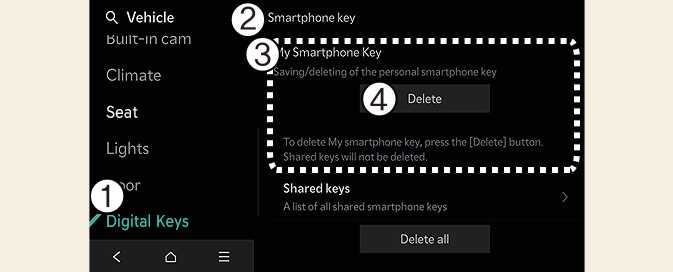 OMV033149N
-
Select Digital Keys
-
Select Smartphone key
-
Select the Digital Key you wish to delete.
-
Select Delete
If the owner's smart phone has been changed, the new smart phone can be registered after only deleting the previous Digital Key 2 (Smart Phone).
-
-
If digital key (smart phone) is deleted, the digital key saved in the smartphone is also deleted.
-
If digital key (smart phone) is deleted on the smart phone, the digital key saved in the vehicle is also deleted.
-
The function to delete shared user's key is not provided by the infotainment system.
-
Digital key (smart phone) is not deleted even if Kia Access app is deleted on the smart phone.
-
Digital key can be activated or deactivated within the Kia Access app provided from your smart phone manufacturer.
The infotainment system may change after software updates. For more information, refer to the user manual provided in the infotainment system and the quick reference guide.