

How to change the mode
The mode can be switched when the switch is in the ON position.
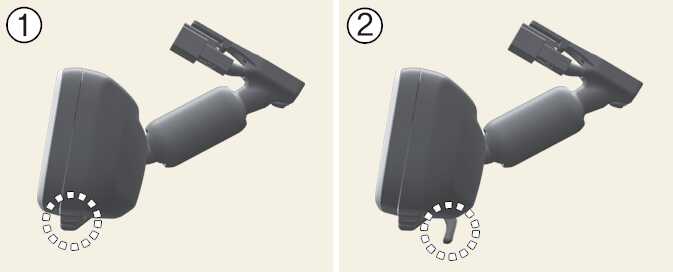
-
Pull the mode select lever to all the way switch to the Digital Center Mirror mode (camera view mode).
Displays an image of the area behind the vehicle. In this mode, the camera indicator is shown.
-
Push the mode select lever to all the way switch to the optical inside rearview mirror mode.
Turns off the display of the Digital Center Mirror allows it to be used as an optical mirror.
Adjusting the mirror height
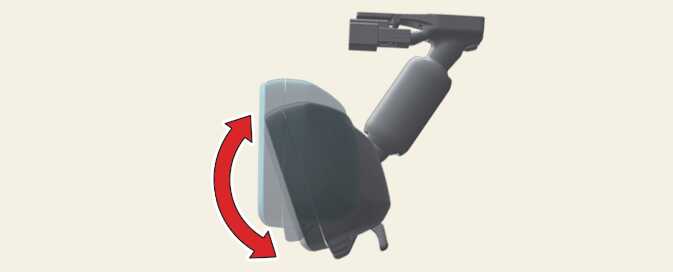
The height of the rearview mirror can be adjusted to suit your driving posture.
Change to optical mirror mode, adjusting the rearview mirror angle by moving it up and down.
Display settings (Digital mirror mode)
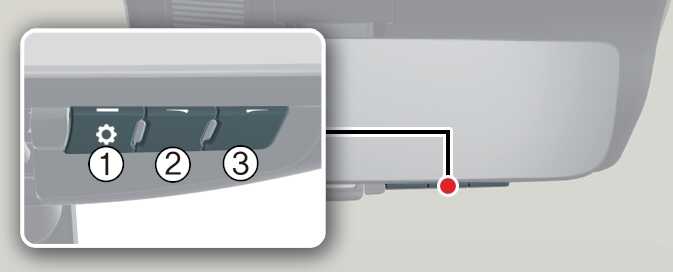
-
Press the menu button (1) The icons will be displayed.
Icons
Settings

Select to adjust the brightness of the display.

Select to adjust the display up/down.
-
Press the menu button (1) repeatedly and select the item you want to adjust.
-
Press the button (2) or button (3) to change the setting.
The icons will disappear if the button is not operated for approximately 5 seconds or more.
If the brightness of the Digital Center Mirror is set too high, it may cause eye strain.
Adjust the Digital Center Mirror to an appropriate brightness. If your eyes become tired, change to optical mirror mode.
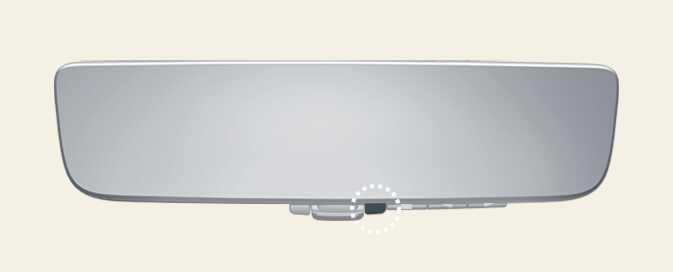
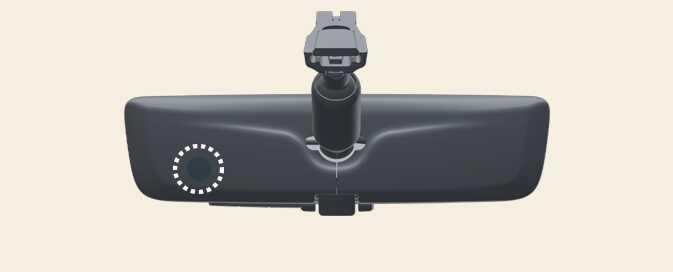
To prevent the light sensors from malfunctioning, do not touch or cover them.
Digital mirror mode operating condition
The EV button is in the ON position. When the EV button is changed ignition switch LOCK/OFF or ACC position, the image will be disappeared.
When using the Digital Center Mirror in digital mirror mode
-
When the liftgate is open, the Digital Center Mirror image may not display properly. Before driving, make sure the liftgate is closed.
-
If the display is difficult to see due to reflected light, close the sunshade of the sunroof.: (if equipped)
-
Any of the following conditions may occur when driving in the dark. None of them indicates that the malfunction has occurred.
-
Colors of objects in the displayed image may differ from their actual color.
-
Depending on your physical condition or age, it may take longer than usual to focus on the displayed image. In this case, change to optical mirror mode.
-
Do not let passengers stare at the displayed image when the vehicle is being driven, as doing so may cause motion sickness.
-
When the system malfunctions
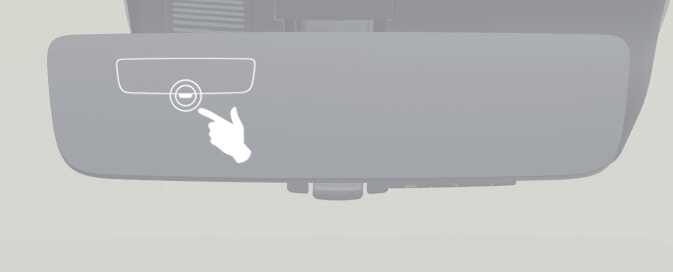
If the symbol shown in the illustration is displayed when using the Digital Center Mirror in digital mirror mode, the system may be malfunctioning. The symbol will disappear in a few seconds. Change to optical mirror mode and have the vehicle inspected by an authorized KIA dealer.
-
To prevent the Digital Center Mirror from malfunctioning.
-
Do not use detergents, such as thinner, benzene, or alcohol to clean the mirror. They may discolor, deteriorate or damage the mirror surface.
-
Do not remove, disassemble or modify the mirror and camera.
-
Do not allow an organic solvent, vehicle wax, window cleaner or glass coating to adhere to the camera. If this happens, wipe it off as soon as possible.
-
When cleaning the camera lens, wipe the camera lens with a damp soft cloth.
-
Do not rub the camera lens with force, as it may be scratched and will not be able to transmit a clear image.
-
Do not subject the camera to a strong impact as this could cause a malfunction. If this happens, have the vehicle inspected by an authorized KIA dealer as soon as possible.
-
Operating the system in the ON position could cause discharge of the battery.
-
Do not attach an antenna of wireless device near the Digital Center Mirror. Electronic waves from a wireless device may cause a distorted image in Digital Center Mirror.
-
Do not push buttons excessively or operate the lever aggressively. It may cause a system failure or the Digital Center Mirror to fall out.
-
Never rotate the body of Digital Center Mirror by 90° or more. It may damage the Digital Center Mirror. Do not apply strong shocks to the body of Digital Center Mirror. It may cause a system failure.
-
If it is difficult to see the Digital Center Mirror display screen because of a strong external light, switch the mode to the conventional rearview mirror mode for better use.
Digital Center Mirror error icon and solution
|
Symptom |
Likely cause |
Solution |
|---|---|---|
|
If the high temp icon (
|
The Digital Center Mirror is extremely hot. (The display will gradually become dimmer. If the temperature continues to increase, the Digital Center Mirror will turn off.) |
Reducing the cabin temperature is recommended to reduce the temperature of the mirror. (The icon will disappear when the mirror becomes cool.) If the icon does not disappear even though the mirror is cool, have the vehicle inspected by an authorized Kia dealer. |
|
If the display icon
|
The system may malfunction. |
Change to optical mirror mode and have the vehicle inspected by an authorized KIA dealer. |
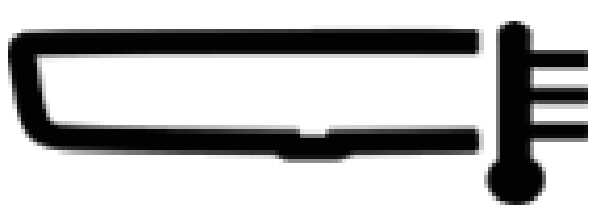 ) is displayed on the display right side.
 has been switched to
 which is the display error icon.