

Map lamp
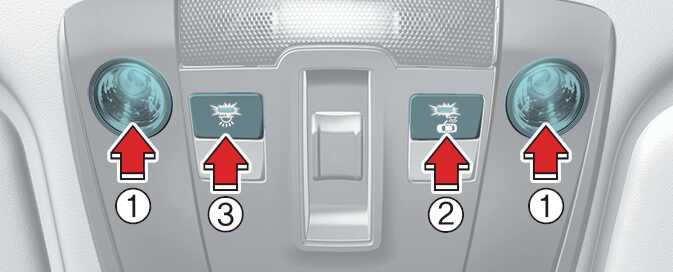
-
Press the lens (1) to turn ON the map lamp.
To turn the map lamp OFF press the lens (1) again.
-
 (2): DOOR mode
-
The map lamp and cabin lamp illuminate when a door is opened. The lamps turn off after approximately 30 seconds.
-
The map lamp and room lamp come on for approximately 30 seconds when doors are unlocked with a smart key as long as the doors are not opened.
-
The map lamp and cabin lamp will stay on for approximately 20 minutes if a door is opened with the ENGINE START/STOP button in the ACC or OFF position.
-
The map lamp and cabin lamp will stay on continuously if the door is opened with the ENGINE START/STOP button in the ON position.
-
The map lamp and cabin lamp will turn off immediately if the ENGINE START/STOP button is changed to the ON position or all doors are locked.
-
To turn off the DOOR mode, press the DOOR button (2) once again (not pressed).
-
-
 (3): Press this switch to turn the front and rear room lamps on and off.
The DOOR mode and ROOM (cabin) mode cannot be selected at a time.