

Forward Safety Warning Timing
-
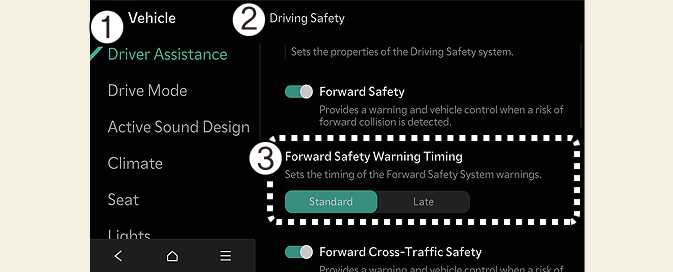
Driver Assistance
-
Driving Safety
-
Forward Safety Warning Timing
With the vehicle on, select Setup → Vehicle → Driver Assistance→ Driving Safety → Forward Safety Warning Timing on the infotainment system to change the initial warning activation timing of Forward Collision-Avoidance Assist.
-
Use Standard in normal driving conditions. If the Warning Timing seems sensitive, change it to Late.
-
If Late is selected, Forward Collision-Avoidance Assist, warns the driver more slowly.
-
Even though Standard is selected for Warning Timing, if the front vehicle suddenly stops, the warning may seem late.
-
Select Later for Warning Timing when traffic is light and when driving speed is slow.
-
Forward/side safety does not provide the warning timing setting.
-
The warning timing you have set will be maintained even if the vehicle is restarted