
Charging status
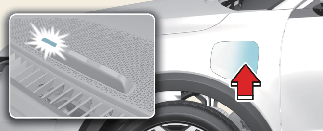
When charging the high voltage battery, the charge level can be checked from outside the vehicle.
It takes about 2 ~ 3 hours or more to complete charging.
|
Operation of charging indicator lampT |
|||||
|---|---|---|---|---|---|
|
Status |
(1) |
(2) |
(3) |
||
|
READY |
Non-charging state |
OFF |
OFF |
OFF |
|
|
Status On |
Main Relay ON status ON |
OFF |
OFF |
Blinking |
|
|
Charging |
0~35% |
Blinking |
OFF |
OFF |
|
|
35~65% |
ON |
Blinking |
OFF |
||
|
65%~ |
ON |
ON |
Blinking |
||
|
Charging complete |
Charging completed (turns off in 5 seconds) |
ON |
ON |
ON |
|
|
Charging failed |
Error while charging |
Blinking |
Blinking |
Blinking |
|
|
Scheduled charging standby |
Reserved charging is operating (turns OFF after 3 minutes) |
OFF |
Blinking |
OFF |
|
Checking charging status
You can check the charging status at the outside of vehicle when charging or using (it is not driving status) the high-voltage battery.
It takes about 2 ~ 3 hours or more to complete charging.
For more information about charging status indicator, refer to More Details.
How to disconnect AC charger

In order to disconnect the charging connector, unlock the doors to unlatch the charging connector lock system. If not, the charging connector and the vehicle's charging inlet may be damaged.
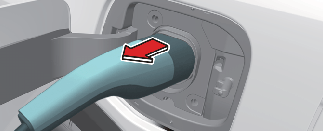
To prevent charging cable theft, the charging connector cannot be disconnected from the inlet when the doors are locked.
However, if the vehicle is in the charging connector AUTO mode, the charging connector automatically unlocks from the inlet when charging is completed.
If the connector is not automatically unlocked after charging is completed in AUTO mode, the connector is unlocked when all of the doors are unlocked.
For more details, refer to More Details.
When disconnecting the charging connector, do not try to disconnect it by force while not pressing the release button. This may damage the charging connector and vehicle charging inlet.
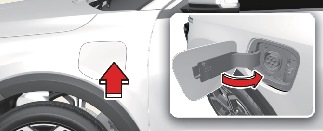
* The charging door does not have a locking system.
-
If you cannot open the charging door due to freezing weather, tap lightly or remove any ice near the charging door. Do not try to forcibly open the charging door. If you open it by force, the charging door may be damaged.
-
Do not modify or disassemble the charging cable components. It may cause a fire or an electric shock with personal injury.
-
Keep the charging connector and the charging plug clean and dry. The charging cable should be also kept dry.
-
Use an air gun to blow any foreign substances from the charging connector and the charging plug.