
Forward/Reverse Parking Distance Warning settings
Warning volume
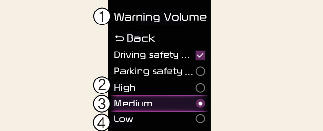
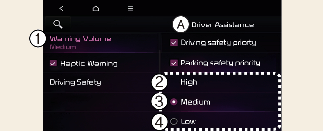
A: Driver Assistance
-
Warning Volume
-
High
-
Medium
-
Low
-
Off (If steering wheel vibration function is equipped)
With the vehicle on, touch Settings → Driver Assistance → Warning Volume on the instrument cluster or Settings → Vehicle → Driver Assistance → Warning Volume on the infotainment system to change the Warning volume to adjust the Warning volume levels; High, Medium, Low or Off.

When the trailer is connected, Reverse Parking Distance Warning Assist automatically turns off (if equipped). In this case, you cannot get help from Reverse Parking Distance Warning. Always drive with care.

-
If the vehicle is restarted, Warning volume will maintain the last setting.
-
If Off is selected, the Warning volume of Forward/Reverse Parking Distance Warning will not turn off, but the volume will sound as Low.
-
If Off is selected, steering wheel vibration (if equipped) will not turn off.
-
If you change the Warning volume, the Warning volume of other Driver Assistance systems may change.
Parking Distance Warning Auto On
You can set the parking distance warning to be ON at low speeds. To use Parking Distance Warning Auto On function, select Settings → Driver Assistance → Parking Safety → Parking Distance Warning Auto On on the instrument cluster or Settings → Vehicle → Driver Assistance → Parking Safety → Parking Distance Warning Auto On on the infotainment system.
When Parking Distance Warning Auto On is selected, the Parking Safety button indicator ( ) stays on.