
Blind-Spot Collision-Avoidance Assist settings
Blind-spot safety
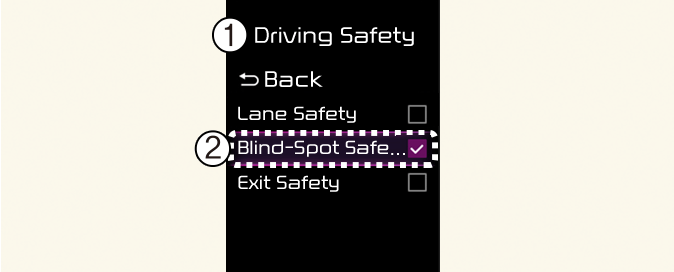
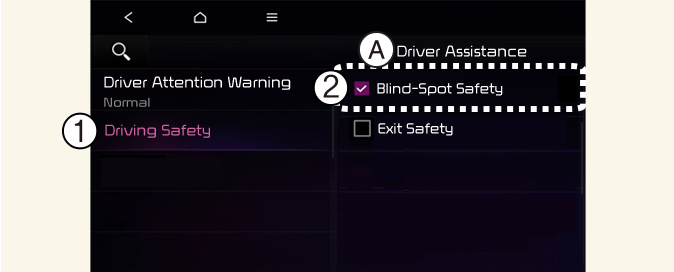
A: Driver Assistance
-
Driving Safety
-
Blind-Spot Safety
With the vehicle on, touch Settings → Driver Assistance → Driving Safety on the instrument cluster or Settings → Vehicle → Driver Assistance → Driving Safety on the infotainment system.
-
Blind-Spot Safety: Blind-Spot Collision-Avoidance Assist will warn and braking assist will be applied depending on the collision risk levels.
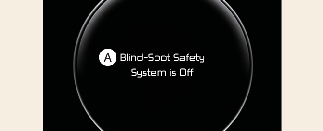
A: Blind-Spot Safety System is Off
When activating Blind-Spot Collision-Avoidance Assist or restarting the vehicle with this function activated, the warning light on the side mirrors will appear for approximately 3 seconds.
When the vehicle is restarted with Blind-Spot Collision-Avoidance Assist inactivated, the warning message will appear on the cluster.

If Blind-Spot Safety is deselected, the driver should always be aware of the surroundings and drive safely.

When the trailer is connected, Blind-Spot Collision-Avoidance Assist automatically turns off (if equipped). In this case, you cannot get help from Blind-Spot Collision-Avoidance Assist. Always drive with care.

If the vehicle is restarted, Blind-Spot Collision-Avoidance Assist will maintain the last setting.
Warning volume
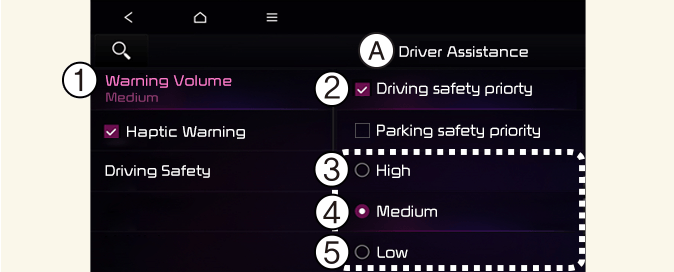
A: Driver Assistance
-
Warning Volume
-
Driving Safety Priority
-
High
-
Medium
-
Low
-
Off (If steering wheel vibration function is equipped)
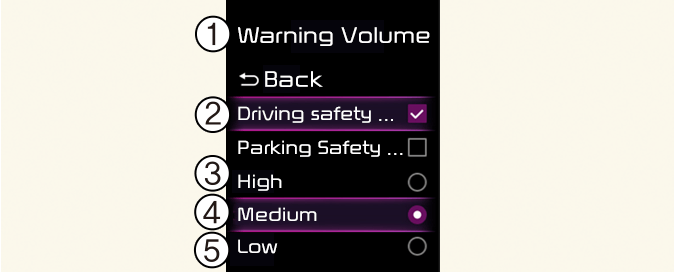
With the vehicle on, touch Settings → Driver Assistance → Warning Volume on the instrument cluster or Settings → Vehicle → Driver Assistance → Warning Volume on the infotainment system to change the Warning volume to adjust the Warning volume levels; High, Medium, Low or Off.
If Driving Safety Priority is selected, the audio volume will temporarily decrease to warn the driver with the audible warning for safe driving.
-
If you change the Warning volume, the Warning volume of other Driver Assistance systems may change.
-
If Off is selected, steering wheel vibration (if equipped) will not turn off.
The setting of the Warning volume applies to all functions of Blind-Spot Collision-Avoidance Assist.