
Forward Collision-Avoidance Assist settings
Forward safety
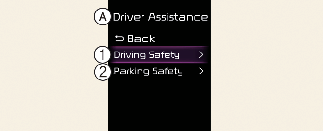
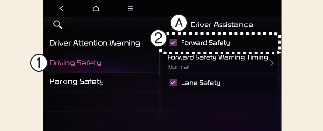
A: Driver Assistance
-
Driving Safety
-
Forward Safety
With the vehicle on, touch Settings → Driver Assistance → Driving Safety on the instrument cluster or Settings → Vehicle → Driver Assistance → Driving Safety on the infotainment system. The initial warning activation timing of Forward Collision-Avoidance Assist can be changed.
-
Forward Safety: Depending on the collision risk levels, an audible warning will sound, steering wheel will vibrate (if equipped) and the braking will be assisted. If the following menu is deactivated, Forward Collision-Avoidance Assist will turn off and the warning light (
 ) will appear on the cluster.
The driver can monitor Forward Collision-Avoidance Assist On/Off status from the Settings menu. If the warning light () remains ON when Forward Collision-Avoidance Assist is on, have the vehicle inspected by a professional workshop. Kia recommends
visiting an authorized Kia dealer/service partner.

When the vehicle is restarted, Forward Collision-Avoidance Assist will always turn on. However, if Forward safety is deselected, the driver should always be aware of the surroundings and drive safely.

-
Steering wheel vibration (if equipped) can be turned on or off.
-
When the trailer is connected, Forward Collision-Avoidance Assist automatically turns off (if equipped). In this case, you cannot get help from Forward Collision-Avoidance Assist. Always drive with care.
Warning timing
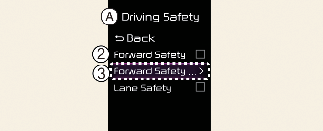
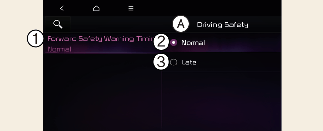
A: Driving Safety
-
Forward Safety Warning Timing
-
Normal
-
Late
With the vehicle on, touch Settings → Driver Assistance → Driving Safety → Forward Safety Warning Timing on the instrument cluster or Settings → Vehicle → Driver Assistance → Driving Safety → Forward Safety Warning Timing on the infotainment system to change the initial warning activation timing of Forward Collision-Avoidance Assist.
-
Use Normal in normal driving conditions. If the Warning Timing seems sensitive, change it to Late.
-
If Late is selected, Forward Collision-Avoidance Assist, warns the driver more slowly.
Warning volume
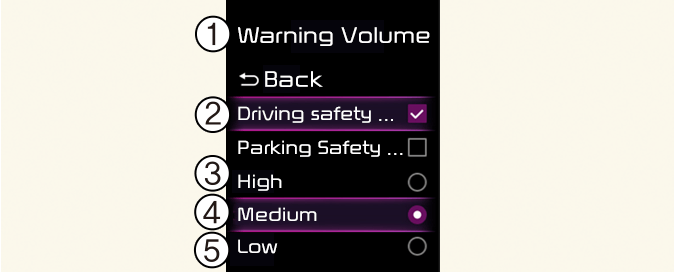
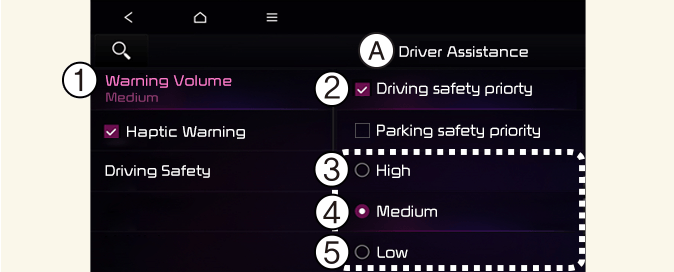
A: Driver Assistance
-
Warning Volume
-
Driving Safety Priority
-
High
-
Medium
-
Low
-
Off (If steering wheel vibration function is equipped)
With the vehicle on, touch Settings → Driver Assistance → Warning Volume on the instrument cluster or Settings → Vehicle → Driver Assistance → Warning Volume on the infotainment system to change the Warning volume to adjust the Warning volume levels; High, Medium, Low or Off.
If Driving Safety Priority is selected, the audio volume will temporarily decrease to warn the driver with the audible warning for safe driving.
-
The setting of the Warning Timing and Warning Volume applies to all functions of Forward Collision-Avoidance Assist.
-
Even though Normal is selected for Warning Timing, if the front vehicle suddenly stops, the warning may seem late.
-
Select Late for Warning Timing when traffic is light and when driving speed is slow.

-
If the vehicle is restarted, Warning timing and Warning volume will maintain the last setting.
-
If Off is selected, the Warning volume of Forward Collision-Avoidance Assist will not turn off, but the volume will sound as Low.
-
If Off is selected, steering wheel vibration (if equipped) will not turn off.
-
If you change the Warning volume, the Warning volume of other Driver Assistance systems may change.