
Setting and activating Blind-Spot Collision Warning
-
Go to the 'User Settings in the cluster → Driver Assistance → Blind-Spot Safety'.
-
Blind-Spot Collision Warning turns on and is ready to be activated when 'Warning Only' is selected. Then, if a vehicle approaches the driver's blind spot area a warning sounds but braking is not applied.
-
The system is deactivated and the indicator on the Blind-Spot Safety button is turned off when 'Off' is selected.
-
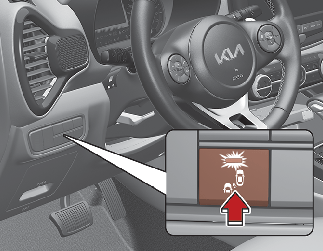
-
If you press the Blind-Spot Safety button while 'Warning Only' is selected the indicator on the button will turn off and the function will deactivate.
-
If you press the Blind-Spot Safety button while the function is canceled the indicator on the button illuminates and the function activates. In this case, the function returns to the state before the vehicle was turned off.
When the function is initially turned on and when the vehicle is turned off then on again while the function is in activation, the warning light will illuminate for 3 seconds on the outer side view mirror.
-
If the vehicle is turned off then on again, the function maintains the last setting.