
User Settings mode (if equipped)
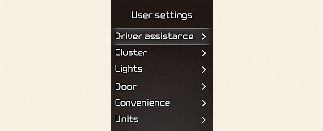
In this mode, you can change the settings of the instrument cluster, doors, lamps, etc.
* The information provided may differ depending on which functions are applicable to your vehicle.
This warning message appears if you try to adjust the User Settings whilst driving.
-
Automatic Transmission
For your safety, change the User Settings after parking the vehicle, applying the parking brake and moving the shift lever to P (Park).
-
Manual Transmission
For your safety, change the User Settings after engaging the parking brake.
|
Items |
Explanation |
|
|---|---|---|
|
Speed Limit |
|
|
|
Warning Methods |
|
|
|
Driver Attention Warning |
To select the function. * For more details, refer to More Details. |
|
|
Driving Safety |
* For more details, refer to More Details/ More Details.
* For more details, refer to More Details.
* For more details, refer to More Details.
* For more details, refer to More Details. |
|
|
Parking safety |
For more details, refer to More Details. |
|
* The information provided may differ depending on which systems are applicable to your vehicle.
|
Items |
Explanation |
|
|---|---|---|
|
Theme Selection |
|
|
|
AUTO STOP Timer |
|
|
|
Wiper/Lights Display |
To activate or deactivate the Wiper/Lights Display function. |
|
|
Traffic Signs |
To activate or deactivate the Traffic Signs function. |
|
|
Icy Road Warning |
To activate or deactivate the Icy Road Warning function. |
|
|
Cluster Voice Guidance Volume |
|
|
|
Welcome Sound |
To activate or deactivate the Welcome Sound function. |
|
* The information provided may differ depending on which functions are applicable to your vehicle.
|
Items |
Explanation |
|
|---|---|---|
|
Illumination |
|
|
|
One Touch Turn Signal |
* For more details, refer to More Details. |
|
|
Headlight Delay |
To activate or deactivate the Headlight Delay function. |
|
|
High Beam Assist |
To activate or deactivate the High Beam Assist function. * For more details, refer to More Details. |
|
* The information provided may differ depending on which functions are applicable to your vehicle.
|
Items |
Explanation |
|---|---|
|
Automatically Lock |
|
|
Automatically Unlock |
|
|
Horn Feedback |
To activate or deactivate the Horn Feedback system. |
|
Remote Window |
To activate or deactivate the remote window control. |
* The information provided may differ depending on which systems are applicable to your vehicle.
|
Items |
Explanation |
|---|---|
|
Rear Occupant Alert |
|
|
Service Interval |
|
|
Welcome Light |
To select the welcome light function. |
|
Welcome Mirror |
To select the welcome mirror function. |
|
Welcome Mirror/Light |
To select the welcome mirror/light function. |
|
Auto Rear Wiper |
|
* The information provided may differ depending on which functions are applicable to your vehicle.
|
Items |
Explanation |
|
|---|---|---|
|
Speed Unit |
To select the Speed unit. |
|
|
Temperature Unit |
To select the Temperature unit. |
|
|
Fuel Economy Unit |
To select the Fuel economy unit. |
|
|
Tyre Pressure Unit |
To select the Tyre Pressure Unit |
|
* The information provided may differ depending on which functions are applicable to your vehicle.
|
Items |
Explanation |
|
|---|---|---|
|
Reset |
You can reset the menus in the User Settings mode. All menus in the User Settings mode are reset to factory settings, except language and service interval. |
|