
Forward Collision-Avoidance Assist settings
Forward Safety
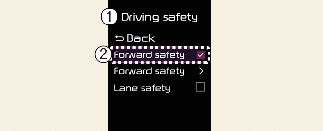
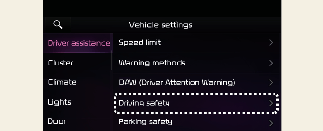
A: Driver assistance
-
Driving safety
-
Forward safety
With the vehicle on, touch User settings → Driver assistance → Driving safety → Driving safety on the instrument cluster or Settings → Vehicle → Driver assistance → Driving safety on the infotainment system. You can select or deselect each function in this menu.
-
Forward safety: Depending on the collision risk levels, an audible warning will sound, and the braking will be assisted. If the following menu is deactivated, Forward Collision-Avoidance Assist will turn off and the warning light (
 ) will appear on the cluster.
The driver can monitor Forward Collision-Avoidance Assist On/Off status from the Settings menu. If the warning light () remains ON when Forward Collision-Avoidance Assist is on, have the vehicle inspected by a professional workshop. Kia recommends
visiting an authorised Kia dealer/service partner.

When the vehicle is restarted, Forward Collision-Avoidance Assist will always turn on. However, if Forward safety is deselected, the driver should always be aware of the surroundings and drive safely.
Forward Safety Warning Timing
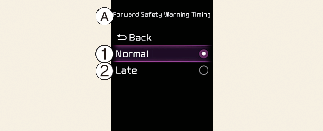
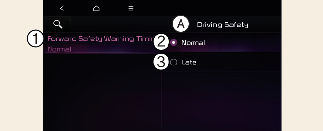
A: Forward safety warning timing
-
Warning timing
-
Normal
-
Late
With the vehicle on, touch User settings → Driver assistance → Driving safety → Forward safety Warning timing on the instrument cluster or Settings → Vehicle → Driver assistance → Driving safety → Forward safety warning timing on the infotainment system to change the initial warning activation timing of Forward Collision-Avoidance Assist.
-
Use Normal in normal driving conditions. If the Warning Timing seems sensitive, change it to Late.
-
If Late is selected, Forward Collision-Avoidance Assist, warns the driver more slowly.

-
Even though Normal is selected for Warning Timing, if the front vehicle suddenly stops, the initial warning activation time may seem late.
-
Select Late for Warning Timing when traffic is light and when driving speed is slow.

-
If the vehicle is restarted, Warning timing will maintain the last setting.
-
If you change the Warning timing, the Warning timing of other Driver Assistance systems may change.
Warning Methods
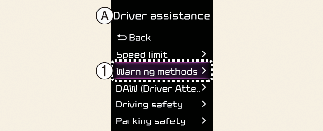
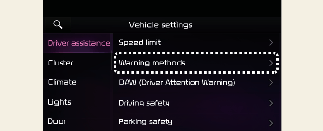
A: Driver assistance
-
Warning methods
The Warning Methods can be set with the vehicle on. Select User settings → Driver assistance → Warning methods from the settings menu in the instrument cluster or Settings → Vehicle → Driver assistance → Warning methods from the settings menu in the infotainment system to change the following settings:
-
Warning volume: Adjusts the volume of the warning sound.
-
Driving safety priority: Lowers all other audio volumes when the Driving Safety system sounds a warning.
-
If you change the Warning Methods, it can be applied to each function of the driver assistance system. Please check and change it in each function.
-
If the vehicle is restarted, Warning Methods will maintain the last setting.
-
The setting menu may not exist based on vehicle specification.