

With the smart key
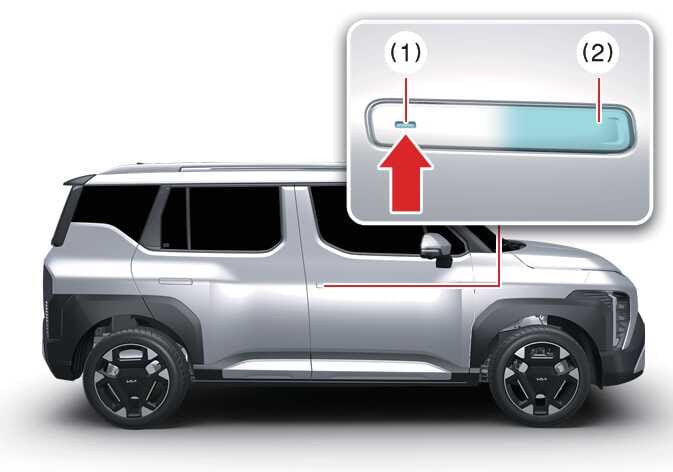 OAYIEV046006R |
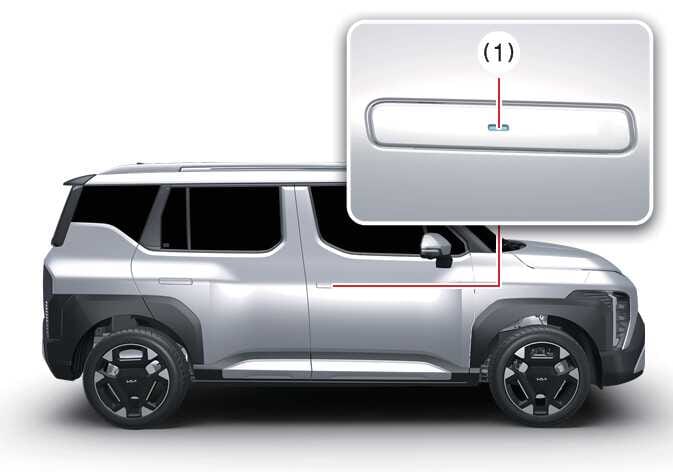 OAYIEV046010R |
Carrying the smart key, you may lock and unlock the vehicle doors (and tailgate). Also, you may start the vehicle. Refer to the following for more details.
Locking
Touch or press the button (the engraved part) of the front door handles with all doors closed and any door unlocked, locks all the doors. If all doors and bonnet are closed, the hazard warning lights will blink once to indicate that all doors are locked.
The button will only operate when the smart key is within 0.7–1 m (28–40 inches) from the front door handles.
Even though you touch or press the front door handle buttons, the doors will not lock if any of following occur:
-
The smart key is in the vehicle.
-
The vehicle is in the POWER ON position.
-
Any door including the tailgate is open.
Unlocking (Manual type)
-
Press the button (2) on the front door handle (the engraved part) whilst carrying the smart key with you, all doors will unlock. The hazard warning lights blink twice to indicate that all doors are unlocked.
-
Once the doors are unlocked, when press the front of the door handle (1) then rear of the door handle will pop out.
-
Pull the outside door handle to open the door.
The button will only operate when the smart key is within 0.7–1 m (28–40 inches) from the front door handle.
When th smart key is recognised in the area of 0.7–1 m (28–40 inches) from the front door handle, other people can also open the door without possession of the smart key.
After pressing the button, the doors will lock automatically unless you open any door within 30 seconds.
Unlocking (Auto type)(if equipped)
-
Touch the button (1) on the front door handle (the engraved part) whilst carrying the Smart Key with you, all doors will unlock. The hazard warning lights blink twice to indicate that all doors are unlocked.
-
The door handle will pop out and the door will unlock. The hazard warning lights will blink twice and the chime will sound twice.
-
Pull the outside door handle to open the door.
The button will only operate when the smart key is within 0.7–1 m (28–40 inches) from the front door handle.
When the smart key is recognised in the area of 0.7–1 m (28–40 inches) from the front door handle, other people can also open the door without possession of the smart key.
After pressing the button, the doors will lock automatically unless you open any door within 30 seconds.
-
Approach the front outside door handle within 1 m (40 in) whilst possessing the smart key or digital key.
-
The outside door handles will pop out. The door will unlock, the hazard warning lights will blink twice, and the chime will sound twice.
Select on the infotainment system.
Self car wash
-
Keep the door locked with the outside door handle closed.
-
The door handle might pop out when moisture or a cloth touched lock/unlock sensor. Stay the key away at least 2 m (78 inches) from the vehicle to prevent the outside door handle operates.
-
Leave the key inside the vehicle, keeping the vehicle in POWER ON position when there is an unintended warning sound.
Automatic car wash
-
When entering an automatic car wash, ensure the vehicle is in POWER ON position and shift the gear to the N (Neutral) position.
-
If the smart key is not in the vehicle, turn off the vehicle and stay the smart key away at least 2 m (78 inches) from the vehicle to prevent the outside door handle operates.
-
Do not unnecessarily open and close the door repeatedly or with excessive force. Such action can damage the vehicle door.
-
If the door is locked/unlocked multiple times in rapid succession with either the vehicle key or door lock switch/button, the system may stop operating temporarily to protect the circuit and prevent damage to system components. Always engage the parking brake, close all windows, and lock all doors when leaving the vehicle unattended.
-
When the vehicle battery voltage is low, the driver’s door automatically switches to emergency mode. In this state, you may hear a click sound when you pull the door handle. This is normal and indicates that the motor is operating.
-
In an emergency, such as when the battery is dead, you can press the front part of the door handle to slide it out manually. Once the door handle slides out, you can unlock the door using the mechanical key and open the door.
-
Even when the doors are unlocked, the door handles retract and the doors lock when you shift the gear to R (Reverse).
-
When you enable the auto lock feature, the door handles retract and doors lock when you shift the gear to R (Reverse).
-
When the doors are unlocked, all door handles retract once the vehicle speed exceeds 3–15 km/h (2–10 mph).
-
When the door handles operate, you might hear an operating sound inside the vehicle.
-
Do not leave the vehicle unlocked for an extended period. If the battery voltage is low, doors other than the driver’s door might not open.
-
In cold climates, the auto up feature may detect resistance and operate improperly due to freezing of the window or door. If possible, operate the windows manually.
-
Never leave the spare key in your vehicle. Otherwise, you might not be able to open the door in an emergency.
-
When you use automatic car wash with the door handles out, door handles can be damaged or the doors can be opened.
-
If the door is closed with strong force or the outside door handle is pulled at high speed, the safety device inside the outside door handle is activated and the door may not be opened even if the door handle is pulled.
At this time, if you pull the outside door handle once more, you can open the door.
-
If Forward Collision-Avoidance Assist (FCA) (if equipped) is activated, the outside door handle may pop out to rescue occupants after a collision. Then, when Forward Collision-Avoidance Assist (FCA) is released, the outside door handle automatically return to their original positions.
-
Securely close your door before you begin driving. Failure to fully close your door may cause it to open during vehicle operation.