
Rear View Monitor operation
Parking/View button
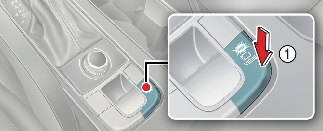
Press the Parking/View button (1) to turn on or off Rear View Monitor when the vehicle is in P (Park) or N (Neutral) or D (Drive) mode.
Rear view function
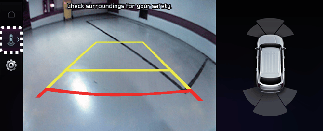
Operating conditions
Rear View Monitor will turn on when the following conditions are satisfied:
-
Shifting the gear to R (Reverse).
-
Pressing the Parking/View button (1) while P (Park), or N (Neutral) and the vehicle speed is slower than 6 mph (10 km/h)
-
Pressing the View icon with the Rear top view on the screen
Off conditions
Rear View Monitor will turn off when the following conditions are satisfied:
-
Shifting the gear to P (Park)
-
Pressing the Parking/View button (1)
-
Pressing the infotainment system operation button
-
Pressing the back button on the rear monitor screen
-
N (Neutral) or D (Drive) and the vehicle speed is faster than 6 mph (10 km/h)

Rear View Monitor will not turn off when the vehicle is in R (Reverse).
Extended Rear View Monitor
If Extended Rear View Monitor is selected, Rear View Monitor keeps displaying the rear view when shifting from R (Reverse) to N (Neutral) or D (Drive). When exceeding a certain speed, the rear view stops displaying.
Top View Parking Guide Lines
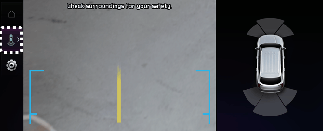
If Rear View Parking Guide Lines is selected, the top view parking guide lines will be displayed at the left side of the infotainment system screen.
Extended Rear View Monitor
Extended Rear View Monitor function maintains the rear view of the vehicle when shifting the gear from R (Reverse) to N (Neutral) or D (Drive) to help you park safely.
Operating conditions
Rear View Monitor will maintain when the following conditions are satisfied:
-
Shifting the gear from R (Reverse) to N (Neutral) or D (Drive).
-
The vehicle speed is below approximately 6 mph (10 km/h).
Off conditions
Extended Rear View Monitor function will turn off when one the following conditions are satisfied:
-
The vehicle speed is above approximately 6 mph (10 km/h).
-
Pressing the Parking/View button (1).
-
Shifting the gear to P (Park).
Rear Top View
Rear Top View shows the rear top view of your vehicle when parking for you to check the distance between an object and behind the vehicle.
Rear Top View will turn on under the following conditions:
-
The gear is shifted to R (Reverse) and the icon is selected among the view buttons.
-
The Parking/View button is pressed, while the gear is in P (Park), N (Neutral) or D (Drive), and vehicle speed is 6 mph (10 km/h) or less.
-
In all views, the video will not turn off when your vehicle is in R (Reverse) mode.
-
The rear-view will always be displayed in R (Reverse).
-
Rear parking guidelines are displayed in the rear-view and rear top view. Select Setup → Vehicle → Driver Assistance → Parking Safety → Camera Settings → Display Information → Rear Parking Guidelines from the settings menu in the infotainment system to display this function. Rear parking guidelines are not displayed in the rear-view while parking.