
Parking Collision-Avoidance Assist malfunction and limitations
Parking Collision-Avoidance Assist malfunction
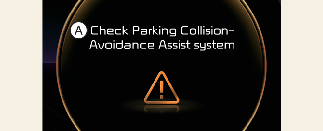
A: Check Parking Collision-Avoidance Assist system
When Parking Collision-Avoidance Assist or other related functions are not working properly, the warning message will appear on the cluster, and Parking Collision-Avoidance Assist will turn off automatically. Have the vehicle inspected by an authorized Kia dealer.
Parking Collision-Avoidance Assist disabled
Wide-rear view camera
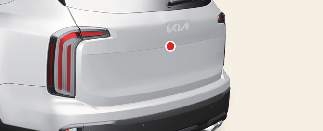
The wide angle cameras are used as detecting sensors to detect pedestrians. If the camera lens is covered with foreign material, such as snow or rain, it may adversely affect camera performance and Parking Collision-Avoidance Assist may not operate properly. Always keep the camera lens clean.
Rear ultrasonic sensors
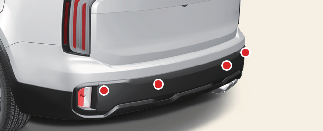
The ultrasonic sensors detect objects around the vehicle. If the sensors are covered with foreign material, such as snow or rain, it may adversely affect sensor performance and Parking Collision-Avoidance Assist may not operate properly. Always keep the rear bumper clean.
Warning message
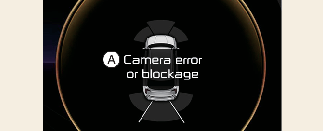
A: Camera error or blockage
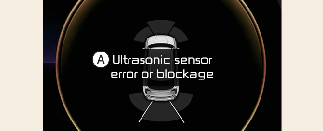
A: Ultrasonic sensor error or blockage
The warning message will appear on the cluster if the following situations occur:
-
The camera(s) or ultrasonic sensor(s) is covered with foreign material, such as snow or rain, etc.
-
There is inclement weather, such as heavy snow, heavy rain, etc.
If this occurs, Parking Collision-Avoidance Assist may turn off or may not operate properly. Check whether the cameras and ultrasonic sensors are clean.
Limitations of Reverse Parking Collision-Avoidance Assist
Parking Collision-Avoidance Assist may not activate braking or warn the driver under the following circumstances:
-
-
Non-factory equipment or accessory is installed
-
Braking system components, such as brake discs and calipers, are modified
-
Wheels are misaligned or suspension components are modified
-
Accessories are attached to the steering wheel or steering components are modified
-
Accident or collision damage
-
Bumper height or ultrasonic sensor installation has been modified
-
Changes in vehicle height due to abnormal tire pressure or excessive loading in the cargo area
-
Wide view camera(s) or ultrasonic sensor(s) are damaged
-
Wide view camera(s) or the ultrasonic sensor(s) is covered with foreign material, such as snow, dirt, etc.
-
A snow chain, spare tire, or wheel of a different size is installed
-
-
There is a problem with the surroundings
-
If there is a pattern on the road
-
When there is shadow on the ground or reflected light
-
Pedestrians or objects are nearby the vehicle’s path
-
Driving through a narrow track or a parking space
-
Driving on uneven roads such as unpaved roads, gravel roads, speed bumps or inclined roads, etc.
-
A trailer or carrier is installed around the rear corner radar
-
Wide view camera(s) is obscured by a light source or by inclement weather, such as heavy rain, fog, snow, etc.
-
The surroundings are very bright or very dark
-
Outside temperature is very high or very low
-
The wind is either strong (above 12 mph (20 km/h)) or blowing perpendicular to the rear bumper
-
Objects generating excessive noise, such as vehicle horns, loud motorcycles or truck air brakes, are near your vehicle
-
An object that generates ultrasonic waves is nearby
-
A wireless device with a transmission function operates near the rear ultrasonic sensor
-
It is affected by another vehicle's parking distance warning function
-
The road is slippery or inclined
-
-
There is a situation with pedestrians or objects
-
The pedestrians are difficult to detect
-
There is ground height difference between your vehicle and the pedestrian
-
The image of a pedestrian in the wide-rear view camera is indistinguishable from the background
-
The pedestrian is near the rear edge of the vehicle
-
The pedestrian is not standing upright
-
The pedestrian is either too short or tall to detect
-
The pedestrian or cyclist is wearing clothing that easily blends into the background, making it difficult to detect
-
The pedestrian is wearing clothing that does not reflect ultrasonic waves
-
Size, thickness, height, or shape of the object does not reflect ultrasonic waves (for example, a pole, bush, curbs, carts, edge of a wall, etc.)
-
The pedestrian or the object is moving
-
The pedestrian or object is very close to the rear of your vehicle
-
There is a large object such as a wall behind a pedestrian or the object
-
The object is not located at the front or rear center of your vehicle
-
The object is not parallel to the rear bumper
-
The face of the object is not parallel to the bumper
-
-
There is a situation with the driving conditions
-
You drive the vehicle immediately after shifting to R (Reverse) or D (Drive)
-
You accelerate or circle the vehicle
-
You drive immediately after starting the vehicle
-

-
Always use extreme caution while driving. You are responsible for safe driving and braking in the event of a potential collision.
-
Always look around your vehicle to make sure there are no pedestrians or objects before moving your vehicle.
-
The performance of Parking Collision-Avoidance Assist may vary under certain conditions. If vehicle speed is above 2 mph (4 km/h), Parking Collision-Avoidance Assist will provide collision avoidance assistance only when pedestrians are detected. Always look around and pay attention when driving your vehicle.
-
Some objects may not be detected by the rear ultrasonic sensors due to the objects distance, size or material, all of which can limit the effectiveness of the sensors.
-
Parking Collision-Avoidance Assist may not operate as expected depending on the road conditions and the surroundings.
-
Do not solely rely on Parking Collision-Avoidance Assist. Doing so may lead to vehicle damage or injuries.
-
Always keep the wide-rear view camera and ultrasonic sensors clean.
-
Do not use any cleaner containing acid or alkaline detergents when cleaning the camera lens. Use only a mild soap or neutral detergent and rinse thoroughly with water.
-
Do not spray the wide-rear view camera or the rear ultrasonic sensors or their surrounding area directly with a high pressure washer. It may cause the wide-rear view camera or the ultrasonic sensors to malfunction.
-
Do not apply objects, such as a bumper sticker or a bumper guard, near the wide-rear view camera or ultrasonic sensors or apply paint to the bumper. Doing so may adversely affect the performance of Parking Collision-Avoidance Assist.
-
Never disassemble or impact the wide-rear view camera or the components of the ultrasonic sensor.
-
Do not apply unnecessary force on the wide-rear view camera or the ultrasonic sensors. Parking Collision-Avoidance Assist may not operate properly if the wide-rear view camera or the ultrasonic sensor(s) are forcibly moved out of proper alignment. Visit an authorized Kia dealer.
-
If any other warning sound such as the seat belt warning chime is already generated, Parking Collision-Avoidance Assist warning may not sound.
-
Parking Collision-Avoidance Assist may not work properly if the bumper has been damaged, replaced or repaired.
-
Parking Collision-Avoidance Assist may not operate properly if interfered with by strong electromagnetic waves.
-
Playing the vehicle audio system at high volume may prevent passengers from hearing Parking Collision-Avoidance Assist warning sounds.
-
The system may not apply braking depending on the status of ESC (Electronic Stability Control).
There will only be a warning when:
-
The ESC (Electronic Stability Control) warning light is on
-
ESC (Electronic Stability Control) is engaged in a different function
-
-
Check your brake fluid and brake pad conditions regularly. The brake performance may decrease depending on brake condition.
-
Turn off Parking Collision-Avoidance Assist when towing a trailer. If towing and moving in reverse, Parking Collision-Avoidance Assist will activate as it detects the trailer.

Parking Collision-Avoidance Assist can detect a pedestrian or an object when:
-
A pedestrian is standing behind the vehicle
-
A large obstacle, such as a vehicle, is parked in the rear center of your vehicle