
Forward Collision-Avoidance Assist settings
Forward safety
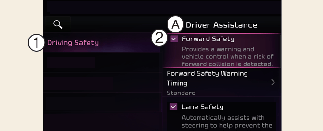
A: Driver assistance
-
Driving safety
-
Forward safety
With the vehicle on, touch Settings → Vehicle → Driver Assistance → Driving Safety on the infotainment system screen to set whether or not to use each function.
-
Forward safety: Collision warning or emergency braking may operate in a collision-imminent situation. If you deselect the setting, Forward safety will turn off and the Forward Safety warning light (
 ) will appear on the cluster.
Forward cross-traffic safety (if equipped)
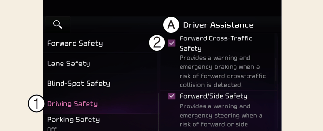
A: Driver assistance
-
Forward safety
-
Forward cross-traffic safety
With the vehicle on, select Settings → Vehicle → Driver assistance → Driving safety → Forward cross-traffic safety from the infotainment system screen to turn on Junction Crossing function and deselect to turn off the function.
-
Forward cross-traffic safety: Collision warning or emergency braking may assist the driver in a collision-imminent situation with oncoming vehicles on the left or right side when crossing an intersection.
Forward/side safety (if equipped)
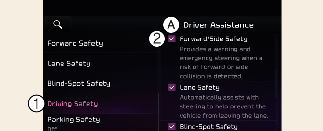
A: Driver assistance
-
Driving safety
-
Forward/side safety
With the vehicle on, touch Settings → Vehicle → Driver assistance → Driving safety → Forward/side safety on the infotainment system. The forward and side vehicle detection function of Forward Collision-Avoidance Assist will be activated.
-
Forward/side safety: Collision warning or emergency steering may assist the driver in a collision-imminent situation. If you deselect the setting, Forward safety will turn off and the Emergency steering warning light (
 ) will appear on the cluster.
The driver can monitor Forward Collision-Avoidance Assist On/Off status from the Settings menu. If the Forward Safety warning
light () or the Emergency steering warning light () remains ON when Forward safety or Forward/side safety is selected, have the vehicle inspected by an authorized Kia dealer.

When the vehicle is restarted, Forward Collision-Avoidance Assist will always turn on. However, if Forward safety is deselected, the driver should always be aware of the surroundings and drive safely.

-
Forward safety provides ‘Basic Function', 'Junction Turning function', and 'Direct Oncoming'. Forward Cross-Traffic Safety provides ‘Junction Crossing function' and Forward/Side Safety provides 'Lane change oncoming function', 'Lane change side function' and 'Evasive Steering Assist function' (if equipped).
-
If Forward safety is set to Off 'Junction Crossing function' will not operate even if Forward Cross Traffic Safety and Forward/Side Cross Traffic Safety are selected. (if equipped)
Forward Safety Warning Timing
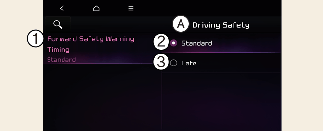
A: Driving safety
-
Forward safety warning timing
-
Standard
-
Late
With the vehicle on, touch Settings → Vehicle → Driver Assistance→ Driving Safety → Forward Safety Warning Timing on the infotainment system to change the initial warning activation timing of Forward Collision-Avoidance Assist.
-
Use Standard in normal driving conditions. If the Forward Safety Warning Timing seems sensitive, change it to Late.
-
If Late is selected, Forward Collision-Avoidance Assist warns the driver more slowly.
-
Even though Standard is selected for Forward Safety Warning Timing, if the front vehicle suddenly stops, the warning may seem delayed.
-
Select Late for Warning Timing when traffic is light and when driving speed is slow.

-
Warning timing setting does not apply on Forward/side safety.
-
The warning timing you have set will be maintained even if the vehicle is restarted.
Warning Methods
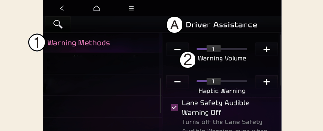
A: Driver Assistance
-
Warning Methods
-
Warning Volume
-
Driving Safety Priority
Your vehicle may allow you to change the Warning Methods setting. To do so, select Setup → Vehicle → Driver Assistance → Warning Methods in the infotainment system to change the following settings:
-
Warning Volume: Adjusts the volume of the warning sound. If you turn off the Warning Volume, for your safety, the function may warn you with a low volume.
-
Haptic Warning: Activate the steering wheel vibration warning.
-
Driving Safety Priority: Lowers all other audio volumes when the Driving Safety system sounds a warning.
-
Ensure that Warning Methods you have set may apply to the Warning Methods of other driver assistance systems.
-
The Warning Methods will maintain their last settings when the vehicle is restarted.
-
The setting menu may not be available for your vehicle depending on the vehicle features and specifications.
-
The Warning Volume and Haptic Warning cannot be turned off at the same time. When one of the warning is turned off the other is activated.