
Safe Exit Assist settings
Exit Safety
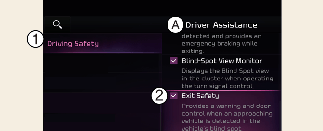
A: Driver Assistance
-
Driving Safety
-
Exit Safety
With the vehicle on, touch Settings → Vehicle → Driver Assistance → Driving Safety → Exit Safety on the infotainment system.

The driver should always be aware of his or her surroundings. If Exit Safety is deselected, Safe Exit Assist cannot assist you.

It you restart the vehicle, Safe Exit Assist will maintain the last setting.
Warning Methods
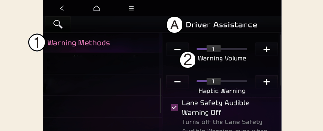
A: Driver Assistance
-
Warning Methods
-
Warning Volume
Warning Methods can be set with the vehicle on. Select Setup → Vehicle → Driver Assistance → Warning Methods from the settings menu in the infotainment system to change the following settings:
-
Warning Volume: Adjusts the volume of the warning sound. If you turn off the Warning Volume, the function may warn you with a low volume.
-
Driving Safety Priority: Lowers all other audio volumes when the Driving Safety system sounds a warning.
-
Ensure that Warning Methods you have set may apply to the Warning Methods of other driver assistance systems.
-
Warning Methods will maintain its last setting even if the vehicle is restarted.