

Map light
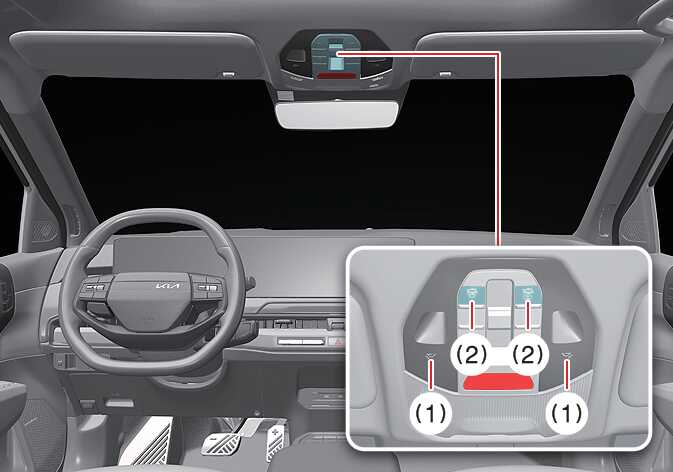 OSVM086005L |
-

 : If you press the button at each location, the map lamp of the corresponding location turns on, and if you press it again, the lamp turns off.
Press and hold the corresponding button for approximately 3 seconds or more while the lamp is on to change the brightness of the left and right map lamps. Release the button at the desired brightness to save the setting.
-
 : Press this button to turn the front and rear seat lamps on. Press it again to turn all lamps off.
To change the brightness of the front and rear seat lamps simultaneously, press and hold the button for approximately 1.5 seconds while the status indicator is illuminated. Release the button at the desired brightness to save the setting.
To reset the overall brightness of the interior lights, press and hold the button for more than 3 seconds while the status indicator is off. The lights blink twice and initialize.
-
 : DOOR mode
-
Indicator OFF
-
The lamp turns on when the door is opened and turns off after closing for about 30 seconds.
-
When unlocking the door with the smart key, the lamp turns on for about 30 seconds and then turns off.
-
When the interior lights remain on for about 30 seconds, they turn off immediately when the vehicle is started or all doors are locked.
-
When the door is opened if the vehicle is in OFF or POWER ON position, the interior light turns on for a maximum of about 10 minutes and then turns off. If the vehicle is in on position, it will stay on continuously.
-
-
Indicator ON
-
The operation of the interior light functions with the opening and closing doors.
-
-
You cannot select the DOOR and ROOM modes at the same time.