

Replacing the key battery
 N_TK25C049_E |
 N_CT25C136 |
 N_CT25C003 |
Simple operation
-
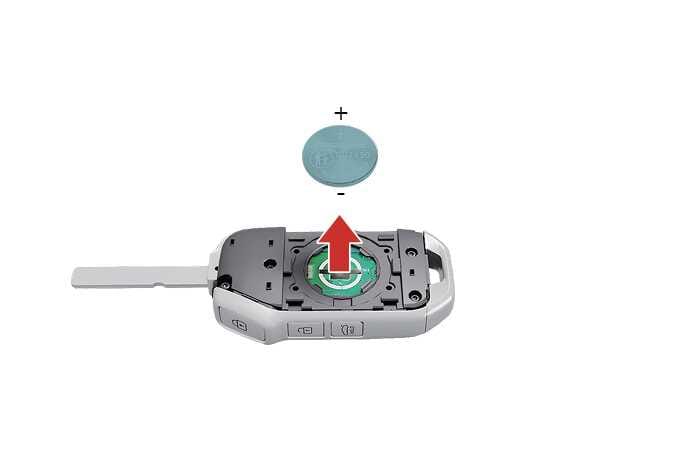
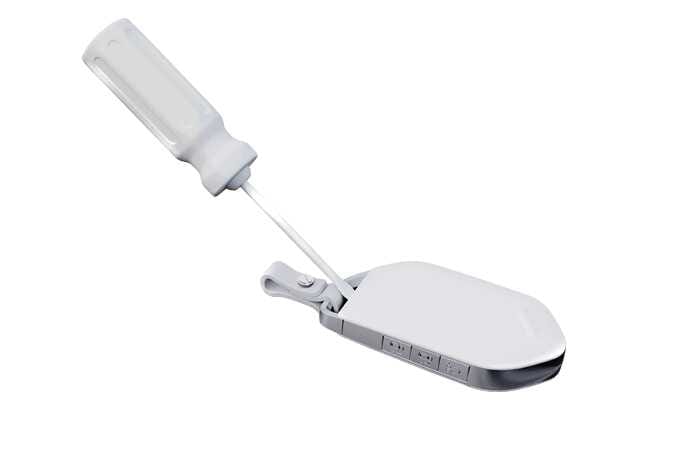
Pry open the key battery cover gently using a thin tool.
Operation
-
Pry open the key battery cover gently using a thin tool.
-
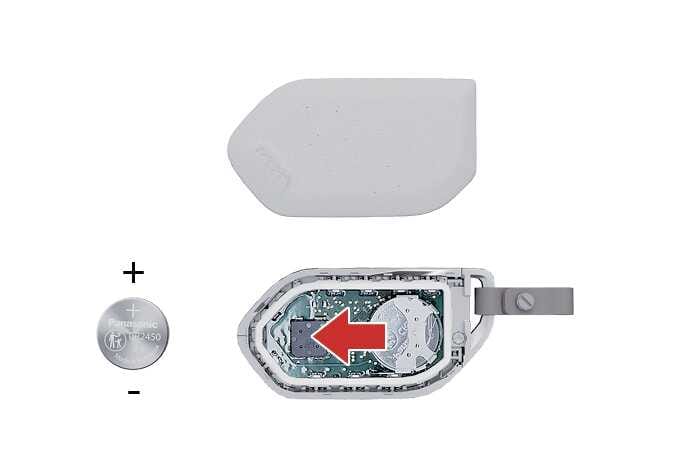
Replace the old battery with a new battery.
When replacing the battery with a new one, make sure align the battery poles properly.
-
Remote key: CR2032
-
Smart key: CR2450
The assembly order is the reverse of the disassembly order.
-
The smart key is designed to give you years of trouble-free use, however it can malfunction if exposed to moisture or static electricity. If you are unsure how to use or replace the battery, Kia recommends to contact an authorized Kia dealer/service partner.
-
Using the wrong battery can cause the smart key to malfunction. Be sure to use the correct battery.
-
To avoid damaging the smart key, don't drop it, get it wet, or expose it to heat or sunlight.
-
 An inappropriately disposed battery can be harmful to the environment and human health. Dispose the battery according to your local law(s) or regulation.
-
If, for some reason, you happen to lose your smart key, you will not be able to start the vehicle. Tow the vehicle, if necessary, contact a professional workshop. Kia recommends to contact an authorized Kia dealer/service partner.
-
A maximum of 2 smart keys can be registered to a single vehicle. If you lose a smart key, Kia recommends to contact an authorized Kia dealer/service partner.
-
When the smart key does not work properly, open and close the door with the mechanical key. If you have a problem with the smart key, Kia recommends to contact an authorized Kia dealer/service partner.
-
If the smart key is not moved for some time, the detection function (if equipped) for smart key operation will pause. Lift the smart key to activate the detection again.
