

Smart key
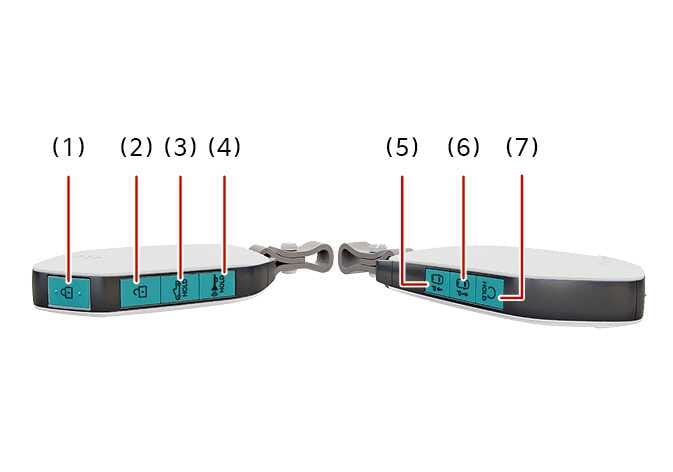 N_TK25C001 |
-
Door Lock

-
Door Unlock

-
Tailgate

-
Panic alarm

-
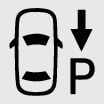
Remote Smart Parking Assist 2 (Backward) : (if equipped)
-
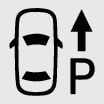
Remote Smart Parking Assist 2 (Forward) : (if equipped)
-
Remote start

Simple operation
-
Press the corresponding button.
-
To start vehicle remotely, press the door lock button (1) and hold the remote start button (7) for 2 seconds.
-
Press the forward/backward buttons (5, 6) to move the vehicle forward/backward.
Operation
-
Press the corresponding button.
-
Press the door lock button (1) and hold the remote start button (7) for 2 seconds to start the vehicle remotely.
-
Press the forward/backward buttons (5, 6) to move the vehicle forward/backward.
Non-operating condition(s)
-
Being in or near a police station, government office, broadcasting station, military unit, transmission tower, airport, port, etc.
-
Carrying a smart key with a mobile electronic system (two-way radio, mobile phone, portable wired and wireless charger, heat transfer device and electronic cigarette) and materials that can block radio waves (coins and metal products).
-
Being close to a radio transmitter such as a radio station or an airport which can interfere with normal operation of the smart key.
-
Being near a mobile two-way radio system or a cellular phone.
-
Another vehicle's smart key is being operated close to your vehicle.
-
Linking an external device to the power outlet and placing the smart key near the external device.
-
If you press the tailgate unlock button for longer than a second, the lock will be released or the tailgate will be opened according to the options of the vehicle.
-
If any door, hood or tailgate remains open, the hazard warning lights will not operate.
-
After pressing unlock button, the doors will lock automatically unless you open any door within 30 seconds.
-
After pressing the Lock/Unlock button, The hazard warning lights will flash.
-
To start the vehicle remotely, the smart key should be detected within 10 m (32 ft) distance from the vehicle, and the remote start button should be pressed within 4 seconds after the doors are locked.
-
If no further action for operating/driving the vehicle is taken, the vehicle will be turned off 10 minutes after starting the vehicle remotely.
-
The driver can move the vehicle forward or backward using the forward/backward buttons (5, 6) on the smart key. For more details of Remote Smart Parking Assist (RSPA), refer to Remote Smart Parking Assist (RSPA) .
THE SMART KEY CONTAINS A LITHIUM BUTTON BATTERY
If swallowed, a lithium button battery can cause severe or fatal injuries within 2 hours.
Keep batteries out of reach of children. Make sure to keep batteries out of reach of children.
If you think batteries may have been swallowed or placed inside any part of the body, seek immediate medical attention.
