Heating and air conditioning

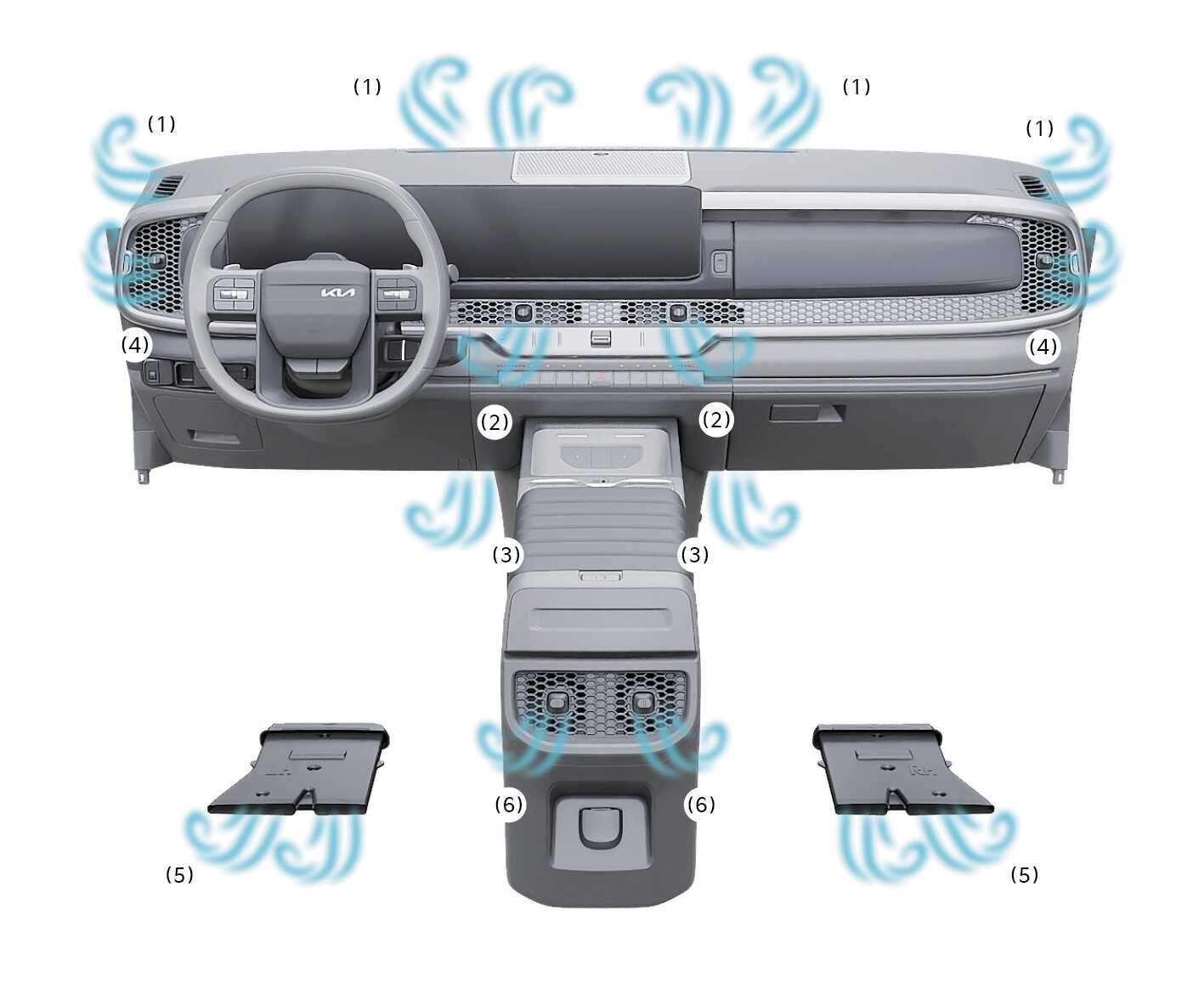
2026 Kia Tasman climate control airflow distribution image. Blue wavy arrows indicate airflow from vents marked (1) windshield, (2) dashboard, (3, 5) floor, (4) side windows, and (6) rear console. Explains air outlet locations for heating and cooling.
N_TK25C047_E
  1. Start the engine.

  2. Set the mode to the desired position.

    To improve the effectiveness of heating and cooling;

    • Heating: 2026 Kia Tasman Heating mode icon. It displays a symbol of a seated figure with an arrow pointing towards the feet. This explains the function of directing airflow to the floor area for heating.

    • Cooling: 2026 Kia Tasman face level air flow icon. The icon displays a silhouette of a seated person with an arrow pointing towards the upper body. It explains the function of directing air flow to the face level to improve cooling effectiveness.

  3. Set the temperature to the desired position.

  4. Set the air intake control to the outside (fresh) air position.

  5. Set the fan speed to the desired speed.

    If air conditioning is desired, turn the air conditioning system on.