Operating the climate control system
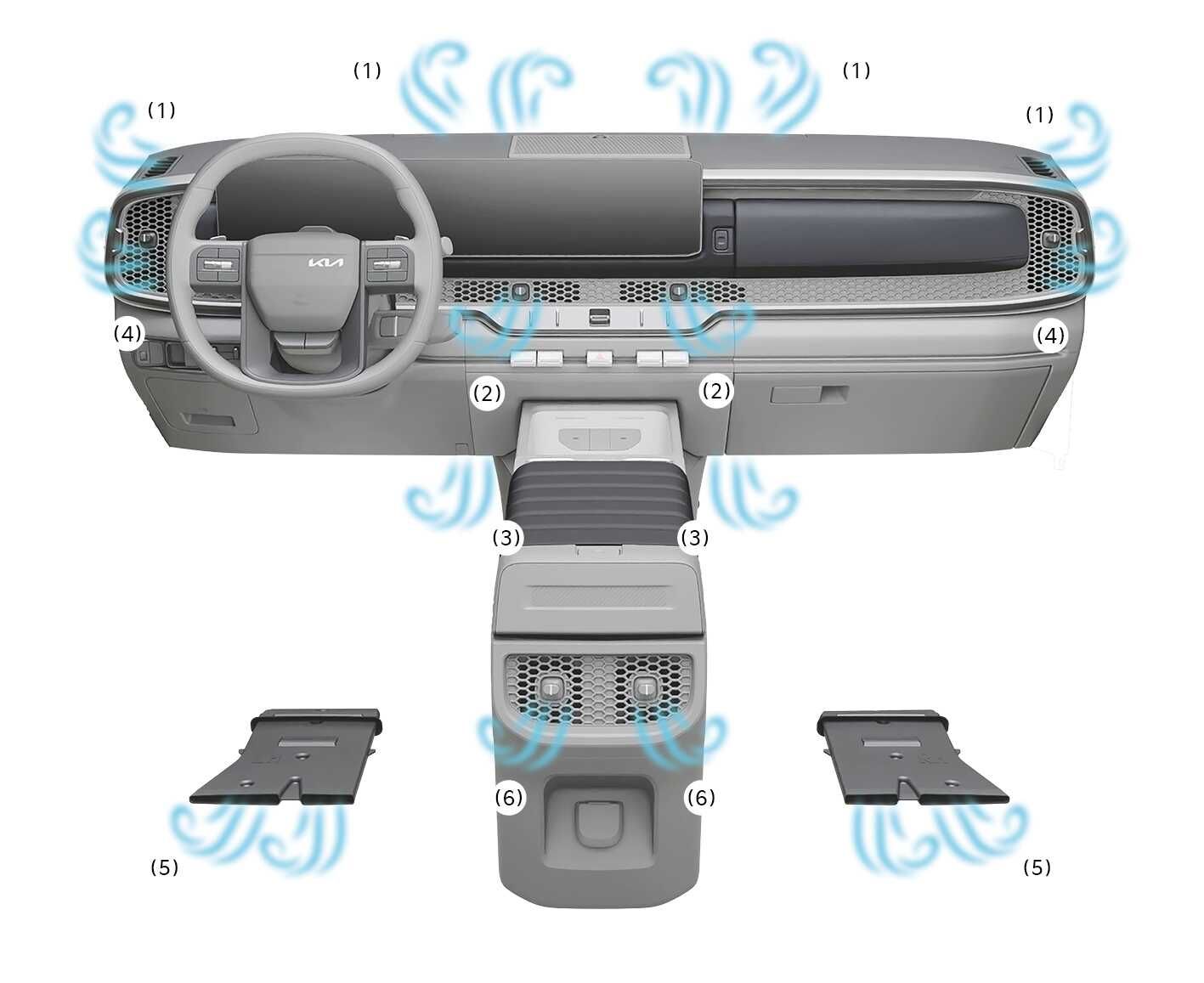
2026 Kia Tasman climate control air vent overview image. Blue wavy lines indicate airflow from vents labeled (1) through (6). Features the windshield defroster (1), dashboard center (2) and side (4) vents, floor vents (5), and rear console vents (3) and (6). Describes the air flow locations for operation modes.
N_TK25C096

Mode

Operation

Air flow

2026 Kia Tasman Face mode icon. A black silhouette of a seated figure with an arrow pointing towards the face area. Explains the function of directing air flow toward the upper body and face.

Air flow is directed toward the upper body and face.

2, 4, 6

2026 Kia Tasman Face and Floor mode icon. A black silhouette of a seated person with arrows pointing towards the face and feet. Explains the function where air flow is directed towards the face and the floor.

Air flow is directed towards the face and the floor.

2, 3, 4, 5, 6

2026 Kia Tasman floor mode icon. A black silhouette of a seated figure with an arrow pointing diagonally down towards the feet. Indicates the climate control setting where air flow is directed mainly to the floor.

Most of the air flow is directed to the floor, with a small amount of air directed to the windshield, side-window defrosters, and side air vents.

1, 3, 4, 5, 6

2026 Kia Tasman Floor and Defrost mode icon. A windshield symbol with three wavy upward arrows is shown alongside a seated figure with a curved arrow pointing towards the feet. Explains the function of directing airflow to the floor and windshield.

Most of the air flow is directed to the floor and the windshield, with a small amount directed to the side-window defrosters and side air vents.

1, 3, 4, 5, 6

2026 Kia Tasman front windshield defroster icon. The image displays a windshield symbol with three wavy arrows pointing upward inside, accompanied by the text 'FRONT' below. Explains the function of directing air flow to the windshield to remove frost or mist.

Most of the air flow is directed to the windshield, with a small amount of air directed to the side-window defrosters and side air vents.

1, 4

Simple operation

  1. Set the mode as desired.

  2. Set the temperature, air intake control, and fan speed.

If the windshield fogs up, select the Front Defrost ( 2026 Kia Tasman Face mode icon. A silhouette of a seated person is shown with a curved arrow pointing towards the face. It explains the function where air flow is directed toward the upper body and face.) mode.

Operation

  1. Start the vehicle.

  2. Set the mode as desired. To improve the effectiveness of heating and cooling:

    • Heating: (2026 Kia Tasman floor mode icon. A black silhouette of a seated figure with an arrow pointing diagonally down towards the feet. Indicates the climate control setting where air flow is directed mainly to the floor.)

    • Cooling: (2026 Kia Tasman Face mode icon. A black silhouette of a seated figure with an arrow pointing towards the face area. Explains the function of directing air flow toward the upper body and face.)

  3. Set the temperature to the desired temperature level.

  4. Set the air intake control to the position for outside (fresh) air if required.

  5. Set the fan speed to the desired speed.

  6. If desired, turn the air conditioning ON with the temperature set high in order to dehumidify the air before it enters into the cabin.

    If the windshield fogs up, select the Front Defrost ( 2026 Kia Tasman Face mode icon. A silhouette of a seated person is shown with a curved arrow pointing towards the face. It explains the function where air flow is directed toward the upper body and face.) mode.