

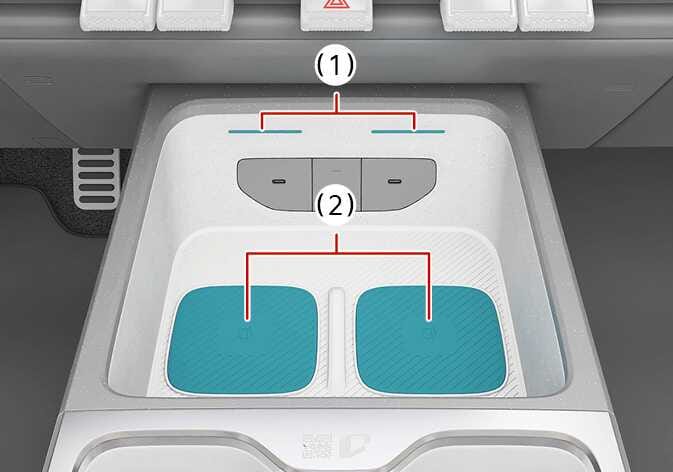
Wireless smartphone charging system: (if equipped)
 N_TK25C144 |
|
Simple operation
-
Place the smart phone on the center of the wireless charging pad.
-
The indicator light will change to orange once the wireless charging begins. After the charging is complete, the orange light will change to green.
With two wireless smart phone charging pads, you can charge two phones at the same time. You can choose to turn the corresponding wireless charging function to either ON or OFF by selecting on the infotainment system screen.
Operation
-
Remove any object on the smart phone charging pad including the smart key. If there is any foreign object on the pad other than a smart phone, the wireless charging function may not operate properly.
-
Place the smart phone on the center of the wireless charging pad.
-
The indicator light will change to orange once the wireless charging begins. After the charging is complete, the orange light will change to green.
With two wireless smart phone charging pads, you can charge two phones at the same time. You can choose to turn the corresponding wireless charging function to either ON or OFF by selecting on the infotainment system screen.
Operating condition(s)
-
The wireless charging system is designed for one smart phone equipped with Qi charging only.
-
If the wireless charging does not work, gently move your smart phone around the pad until the charging indicator light turns orange. Depending on the smart phone, the charging indicator light may not turn green even after the charging is complete.
-
If the wireless charging is not functioning properly, the orange light will blink and flash for ten seconds then turn off. In such cases, remove the smart phone from the pad and replace it on the pad again, or double check the charging status.
When using a smartphone application (such as Android Auto) while charging, charging may be delayed or stopped. This is not a problem with the wireless charging system but is caused by the smartphone overheating. Please remove the smartphone from the charging pad.
If any metallic object such as coins is located between the wireless charging system and the smart phone, the charging may be disrupted. Also, the metallic object may heat up.
-
When the interior temperature of the wireless charging system rises above a set temperature, the wireless charging will cease to function. After the interior temperature drops below the threshold, the wireless charging function will resume.
-
If there is any metallic object between the smart phone and the wireless charging pad, immediately remove the smart phone. Remove the metallic object after it has completely cooled down.
-
The wireless charging may not function properly when there is a heavy accessory cover on the smart phone.
-
The wireless charging will stop when using the wireless smart key search function to prevent radio wave disruption.
-
The wireless charging will stop when the smart key is moved out of the vehicle in ON position.
-
The wireless charging will stop when any of the doors is opened (applicable for vehicles equipped with smart keys).
-
The wireless charging will stop when the vehicle is turned OFF.
-
The wireless charging will stop when the smart phone is not in complete contact with the wireless charging pad.
-
Items equipped with magnetic components such as credit card, telephone card, bankbook, any transportation ticket and such may become damaged during wireless charging.
-
Place the smart phone on the center of the charge pad for best results. The smart phone may not charge when placed near the rim of the charging pad. When the smart phone does get charged, it may heat up excessively.
-
For smart phones without built-in wireless charging system, an appropriate accessory has to be equipped.
-
Smart phones of some manufacturers may display messages on weak current. This is due to the particular characteristic of the smart phone and does not imply a malfunction on wireless charging function.
-
The indicator light of some manufacturers' smart phones may still be orange after the smart phone is fully charged. This is due to the particular characteristic of the smart phone and not a malfunction of the wireless charging.
-
When any smart phone without a wireless charging function or a metallic object is placed on the charging pad, a small noise may sound. This small sound is due to the vehicle discerning compatibility of the object placed on the charging pad. It does not affect your vehicle or the smart phone in any way.
-
The wireless cellular phone charging system may not support certain cellular phones, which are not verified for the Qi specification (
 ).
). -
For certain cellular phones with their own protection, the wireless charging speed may decrease and the wireless charging may stop.
For some manufacturers' smart phones, the system may not warn you even though the smart phone is left on the wireless charging unit. This is due to the particular characteristic of the smart phone and not a malfunction of the wireless charging.
