

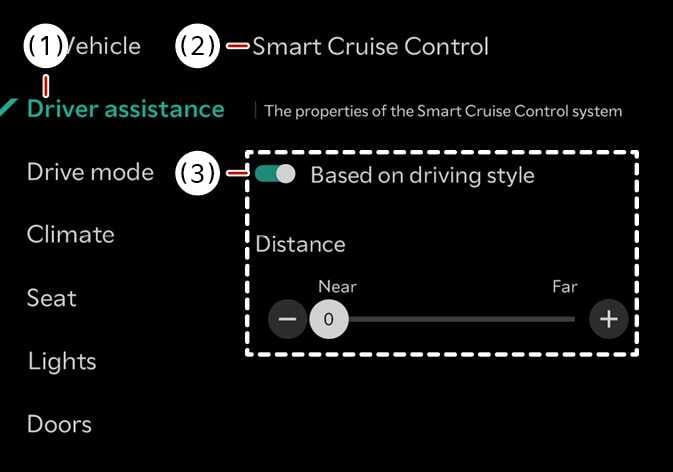
Based on driving style: (if equipped)
 N_TK25Z022E |
|
With the vehicle on, if is selected from the infotainment system screen, Smart Cruise Control will operate based on the driver's driving style, such as vehicle distance, acceleration, reaction speed.
The driver's driving style can be adjusted each driving style manually.
-
If equipped with Based on Driving Style, Based on driving mode and Based on driving style can be selected from the infotainment system screen by selecting .
-
While Smart Cruise Control is operating with Based on driving style selected, if you press and hold the Vehicle Distance button (
 ), based on driving mode will disabled. Press and hold the Vehicle Distance button () to change Smart Cruise Control to Based on driving style mode.
 -
Smart Cruise Control learns the driver's driving styles only when the driver drives the vehicle.
-
When Based on Driving Style is deactivated, the driver's driving tendency (vehicle distance, acceleration strength, and responsiveness) will remain at the same level as when Based on Driving Style is activated.
-
Even if the levels of driving tendency (vehicle distance, acceleration strength, and responsiveness) displayed are the same regardless of whether Based on Driving Style is activated or deactivated, the actual control characteristics may differ.
