
Head-Up Display (HUD) (if equipped)
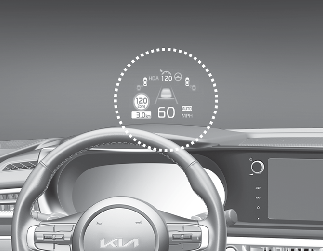
-
The Head-Up Display image on the HUD screen may be invisible when:
-
Sitting posture is bad.
-
Wearing a polarized sunglasses.
-
There is an object on the cover of the Head-Up Display.
-
Driving on a wet road.
-
An inadequate lighting is turned on inside the vehicle.
-
Any light comes from the outside.
-
Wearing an inadequate glasses to your eyesight.
-
-
If the Head-Up Display image is not shown well, adjust the height, rotation or illumination of the Head-Up Display in the cluster.
-
When the Head-Up Display needs inspection or repair, have your vehicle inspected or repaired by an authorized Kia dealer.

Head-Up Display
-
Do not place any accessories on the Head-Up Display shutter. It might fall into Head-Up Display and can damage to Head-Up Display.
-
Do not attach stickers or accessories to the Head-Up Display and the crash pad.
-
Do not manually adjust the shutter and combiner. The images may not be visible due to fingerprints. Excessive external force during operation may cause damage.
-
Do not place any objects near the Head-Up Display. Interference with the object during operation may damage it.
-
Do not place any objects around the Head-Up Display. It might enter the narrow gap of the cover and affects operation.
-
Do not place any liquids around the Head-Up Display. Water or other liquids can flow into the Head-Up Display and break it.
-
Do not expose the combiner to strong light. The combiner may become deformed.
-
Do not use organic solvents, detergents or abrasive cloths to clean the Head-Up Display. Wipe it off with a soft cloth. Do not strongly wipe Head-Up Display shutter. It might get damaged.
-
For safety, be sure to adjust the settings when the vehicle is stopped.
-
When opening, closing and height adjusting the Head-Up Display, noise may be generated by the motor and gear.
- Contains Topics
- Head-Up Display Information
- Head-Up Display Setting