
Surround View Monitor operation
Surround View Monitor controller
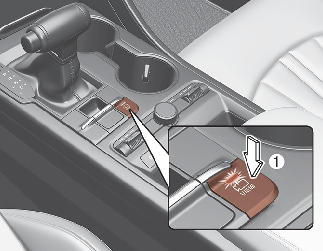
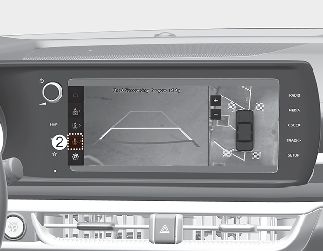
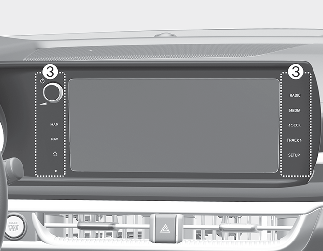
-
Press the Parking/View button (1) to turn on Surround View Monitor.
Press the button again to turn off the function.
-
Other view modes can be selected by touching the view icons (2) on the Surround View Monitor screen.
-
When one of the infotainment system button (3) is pressed without the gear in R (Reverse), Surround View Monitor will turn off.
Front view
The function displays front view with the gear in N (Neutral) or D (Drive) to help you park safely. Front view contains top view/front view.
Operating conditions
When the gear is shifted from R (Reverse) to N (Neutral) or D (Drive), the last set mode of front view function will be selected.
-
Front view function will operate when the following conditions are satisfied:
-
While the infotainment system screen is being displayed, press the Parking/View button (1) briefly when the gear is in D (Drive) or N (Neutral) and vehicle speed is below 9 mph (15 km/h).
-
-
The Surround View Monitor Auto On will operate when the following conditions are satisfied:
-
With ‘Driver Assistance → Parking Safety → Surround View Monitor Auto On’ selected from the Settings menu, the front parking assist view screen is displayed when Parking Distance Warning warns the driver while driving in D (Drive).
-
Off conditions
-
Press the Parking/View button (1) again, the image will turn off.
-
When vehicle speed is above 9 mph (15 km/h) and the gear is in D (Drive), Surround View Monitor will be turned off and the screen will be changed to the infotainment system screen with the Surround View Monitor. The screen will not revert to the surround view screen even though the vehicle speed is below 19 mph (15 km/h) again.
-
Press one of the infotainment system button (3), the screen will change to the infotainment system screen.
Rear view
The function displays rear view with the gear in N (Neutral) or D (Drive) to help you park safely. Rear view contains top view/rear view/side view.
Operating conditions
-
Shift the gear to R (Reverse), the image will appear on the screen.
-
Press the Parking/View button (1) while the gear is in P (Park), the image will appear on the screen.
Off conditions
-
The image cannot be turned off when the gear is in R (Reverse).
-
Shift the gear from R (Reverse) to P (Park), the image will turn off.
-
Press the Parking/View button (1) again while the gear is in P (Park) with the image on the screen.