
Smart Cruise Control (SCC)
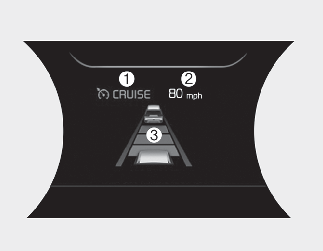
-
Cruise indicator (
 )
)
-
Set speed
-
Vehicle distance

For your safety, please read the owner's manual before using Smart Cruise Control.

To activate Smart Cruise Control, depress the brake pedal at least once after turning the POWER button to the ON position or starting the vehicle. This is to check if the brake switch which is important part to cancel Smart Cruise Control is in normal condition.
Smart Cruise Control Limitations
Smart Cruise Control is a supplemental function and is not a substitute for safe driving practices. It is the responsibility of the driver to always check the speed and distance to the vehicle ahead.
- Contains Topics
- Driving Assist button
- To set Smart Cruise Control Speed :
- To increase Smart Cruise Control set speed:
- To decrease Smart Cruise Control set speed:
- To temporarily accelerate with Smart Cruise Control on :
- Smart Cruise Control will be temporarily canceled when:
- Resuming Smart Cruise Control set speed
- To turn Smart Cruise Control off:
- Set Smart Cruise Control Reaction
- Setting vehicle distance
- When the lane ahead is clear:
- When there is a vehicle ahead of you in your lane:
- Detecting Sensor (Front view camera/Front radar)
- To convert to Cruise Control mode:
- Limitations of Smart Cruise Control
- This device complies with Part 15 of the FCC rules.
- Radio frequency radiation exposure information: