
Lane Keeping Assist operation
To activate/deactivate Lane Keeping Assist
To activate/deactivate Lane Keeping Assist, with the POWER button in the ON position, take the following steps:
-
Press and hold the Lane Safety button located on the instrument panel on the lower left hand side of the driver.
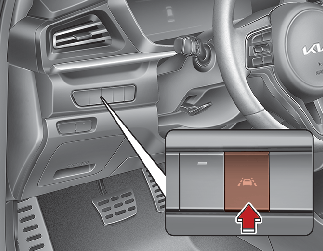
The indicator in the cluster display will initially illuminate white.
If the indicator (white) was activated in the previous vehicle ON, the function turns on automatically.
If you press and hold the Lane Safety button again, the indicator on the cluster display will go off.
-
press and hold the Lane Driving Assist button (
 ) located on the steering wheel to turn off Lane Keeping Assist.
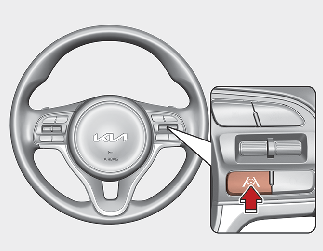
Press and hold the button again to turn on the function.The indicator (
 ) in the cluster display will initially illuminate white. If you pressing and holding the Lane Driving Assist button located
on the steering wheel, Lane Keeping Assist will be turned off and the indicator on the cluster display will go off.
) in the cluster display will initially illuminate white. If you pressing and holding the Lane Driving Assist button located
on the steering wheel, Lane Keeping Assist will be turned off and the indicator on the cluster display will go off.
The color of indicator will change depend on the condition of Lane Keeping Assist.
-
White: Sensor does not detect the lane marker or vehicle speed is less than 40 mph (64 km/h).
-
Green: Sensor detects the lane marker and function is able to control the steering.