
Utility Mode (if equipped)
The high voltage battery is used instead, to maintain the 12 V auxiliary battery, for operating the convenient 12 V features of the vehicle.
System Setting and Conditions
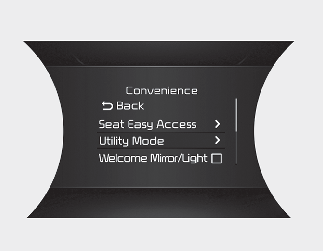
When the following conditions are satisfied, you can activate the Utility Mode function on the LCD.
-
Press the MODE button (
 ) several times on the steering wheel until 'User Settings' menu appears on the LCD.
-
Select 'Utility Mode' with the MOVE switch (
 /
/  ) and the OK button on the steering wheel.
-
The vehicle is in the ready
 mode.
mode.
-
The gear is shifted to P (Park).
-
The Electronic Parking Brake (EPB) is applied.
System Activation
When the system is activated:
-
The
indicator will turn off and the  indicator will illuminate on the cluster.
-
All electric devices are usable but the vehicle cannot be driven.
-
The EPB can be cancelled by pressing the EBP switch.
-
Gear cannot be shifted out of P (Park). If a shift attempt is made, a message "Shifting conditions not met" will be displayed on the cluster.
Deactivation
The Utility Mode can be deactivated by pressing the START/STOP button to the OFF position