
Auto defogging for automatic climate control  (if equipped)
Operation
-
The Auto Defogging System will be enabled as follows:
-
The A/C button will turn ON.
-
The air intake control will change to fresh mode under low outside temperature.
-
The mode will be changed to defrost to direct the airflow to the windscreen.
-
The fan speed will be increased.
-
Operating condition(s)
-
When the heater or air conditioning is on.
-
A high amount of humidity is detected in the vehicle.
Cancelling or resetting auto defogging
Operation
-
Press (
 ) for 3 seconds.
-
The button indicator will blink 3 times if cancelled.
-
The button indicator will blink 6 times if reset.
-

-
When the air conditioning is turned on by Auto defogging system, if you try to turn off the air conditioning, the air conditioning will not be turned off.
-
To maintain the effectiveness and efficiency of the Auto Defogging System, do not select Recirculation mode whilst the system is operating.
-
When the Auto Defogging System is operating, the fan speed adjustment knob, the temperature adjustment knob, and the air intake control button are all disabled.
-
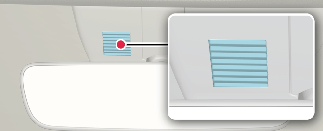
Do not remove the sensor cover located on the upper end of the driver side windscreen glass.
Damage to system parts could occur and may not be covered by your vehicle warranty.