
Front seat adjustment for power seat
The driver's seat can be adjusted by using the control switches located on the outside of the seat cushion. Before driving, adjust the seat to the proper position so as to easily control the steering wheel, pedals and switches on the instrument panel.

The power seat is operable with the ignition OFF.
Therefore, children should never be left unattended in the car.

-
The power seat is driven by an electric motor. Stop operating once the adjustment is completed. Excessive operation may damage the electrical equipment.
-
When in operation, the power seat consumes a large amount of electrical power. To prevent unnecessary charging system drain, don't adjust the power seat longer than necessary while the engine is not running.
-
Do not operate two or more power seat control switches at the same time. Doing so may result in power seat motor or electrical component malfunction.
Moving forward and backward
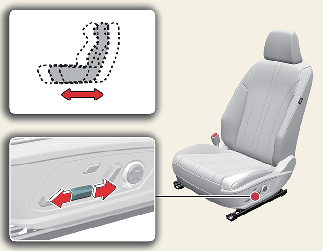
To move the seat forward or backward:
-
Push the control switch forward or backward to move the seat to the desired position.
-
Release the switch once the seat reaches the desired position.
Reclining seatback
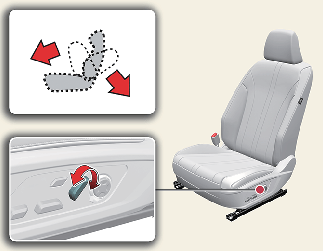
To recline the seatback:
-
Push the control switch forward or backward to move the seatback to the desired angle.
-
Release the switch once the seat reaches the desired position.
Changing seat cushion tilt and height
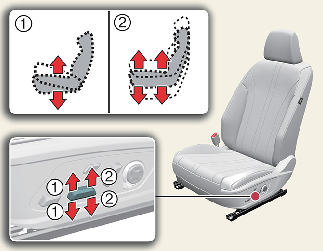
To change the height of the seat:
-
Pull the front portion of the control switch up to raise or press down to lower the front part of the seat cushion.
Pull the rear portion of the control switch up to raise or press down to lower the seat cushion.
-
Release the switch once the seat reaches the desired position.
Adjusting lumbar support (if equipped)
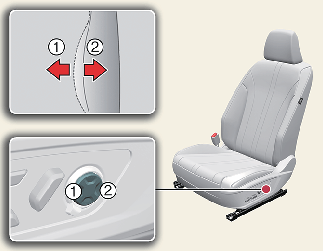
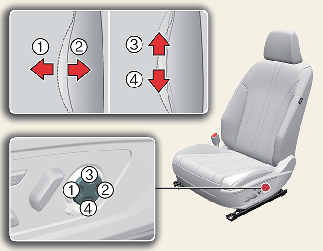
To adjust the lumbar support:
-
Press the front portion (1) of the switch to increase the support, or the rear portion (2) of the switch, to decrease the support.
-
Press the upper portion (3) of the switch to raise the support, or the lower portion (4) of the switch, to lower the support.
-
Release the switch once it reaches the desired position.
Adjusting cushion extension for driver's seat (if equipped)
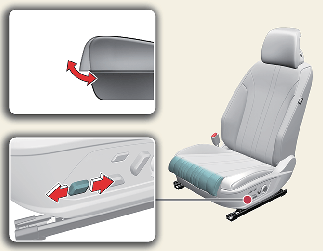
-
Push the control switch forward to raise the cushion extension or backward to lower it.
-
Release the switch once the cushion extension reaches the desired position.
Adjusting seat bolster for driver's seat (if equipped)
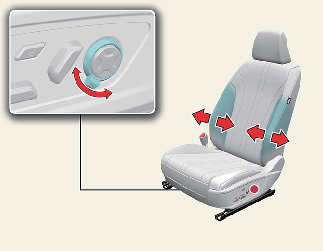
To adjust seat bolster:
-
Turn the adjustment switch clockwise, the seatback bolsters will be adjusted inward.
-
Turn the switch counterclockwise, the seatback bolster will be adjusted outward.
-
To maximize the bolster support, use the switch for 8 seconds. After that, the height will not change even if you continue to operate the switch. Release the switch.
Cushion support
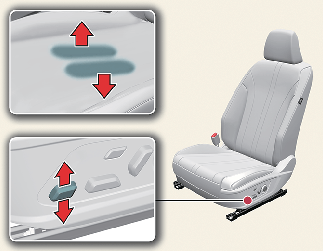
Push the switch upward to raise the cushion support, or downward to lower it.
Ergo-motion seat (for driver's seat) (if equipped)
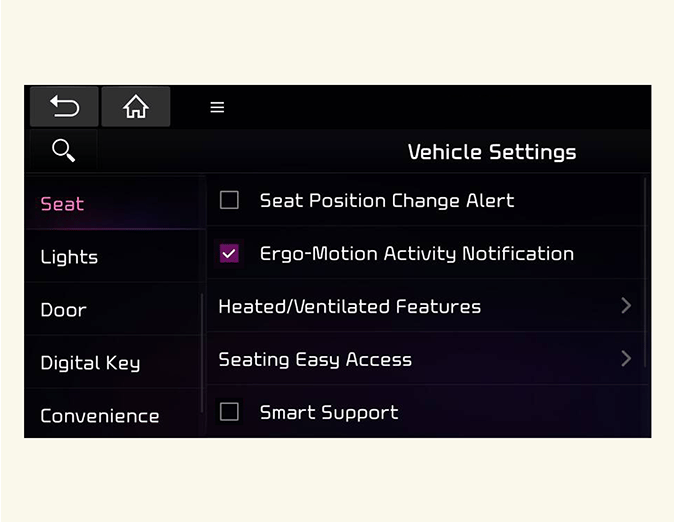
Select 'Ergo-Motion Seat' from the infotainment system's Settings menu to select and set up supplemental functions for the driver.
Before actually using each function, try the functions with the vehicle parked.
Comfortable stretch
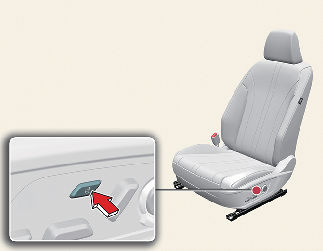
Comfortable stretch is a function that helps relieve fatigue of the driver's pelvis and lower back due to driving.
Comfortable stretch can be turned off by pressing the button for 1 second or more during the operation.
Every time you press the button, you may select a mode or turn off the function in the following order.
-
Pelvic stretching: The cushion portion moves, helping the left and right movement of the pelvis.
-
Lumbar stretching: The seatback portion moves, helping back and forth movement of the lower back.
-
Whole body stretching: The cushion and seatback moves in sequence, helping the whole body reduce fatigue.
-
OFF: Turns off comfortable stretch.
If the seat adjustment switch (cushion support, lumbar support, bolster adjuster) is pressed during comfortable stretch operation, the operation will stop.
Also, you can change the operation intensity and operation time from the Settings menu in the infotainment system screen.
-
Intensity: Seat → Ergo-Motion Seat → Comfortable Stretch → Strong/Normal
-
Time: Seat → Ergo-Motion Seat → Comfortable Stretch → Operational Time → Long (20min.)/Normal (15min.)/Short (10min.)
Posture assist
After driving for an hour, Posture Assist automatically adjusts the pelvis and back portion of the driver's seat to assist the driver's posture.
If the seat adjustment switch (cushion support, lumber support, bolster adjuster) is pressed or any related function is activated while the posture assist function is operating, the function will be activated approximately 1 hour after the adjustment was made.
Select 'Setup → Vehicle Settings → Seat → Ergo-Motion Seat → Posture Assist' from the Settings menu in the infotainment system screen to activate or deactivate Posture Assist function.
Smart support
The driver's seat bolster support increases when the vehicle speed is above 130 km/h (80 mph), and the support is canceled when the vehicle speed is below 110 km/h (70 mph).
The driver's seat bolster support increases and the seat cushion support moves to its initial state when SPORT mode is selected.
Select 'Setup → Vehicle Settings → Seat → Ergo-Motion Seat → Smart Support' from the Settings menu in the infotainment system screen to activate or deactivate Smart support function.