
Heating and air conditioning manually
The heating and cooling system can be controlled manually by pressing buttons other than the AUTO button.

In this case, the system works sequentially according to the order of buttons selected.
-
Start the vehicle.
-
Set the mode to the desired position.
For improving the effectiveness of heating and cooling;
-
Heating:

-
Cooling:

-
-
Set the temperature control to the desired position.
-
Set the air intake control to the outside (fresh) air position.
-
Set the fan speed control to the desired speed.
If air conditioning is desired, turn the air conditioning system on.
Press the AUTO button in order to convert to fully automatic control of the system.
Mode selection
The mode selection button controls the direction of the air flow through the ventilation system.

The air flow outlet ports are switched in the following sequence:

 Face-Level (B, D, F)
Air flow is directed toward the upper body and face. Additionally, each outlet can be controlled to direct the air discharged from the outlet.
 Bi-Level (B, C, D, E, F)
Air flow is directed towards the face and the floor.
 Floor-Level (A, C, D, E, F)
Most of the air flow is directed to the floor, with a small amount of the air being directed to the windshield, side window defrosters and side air vents.
 Floor/Defrost-Level (A, C, D, E, F)
Most of the air flow is directed to the floor and the windshield with a small amount directed to the side window defrosters and side air vents.
 Defrost-Level (A, D)
Most of the air flow is directed to the windshield with a small amount of air directed to the side window defrosters and side air vents.
Instrument panel vents


You can adjust the direction of air delivered from these vents using the vent control lever as shown.
Temperature control
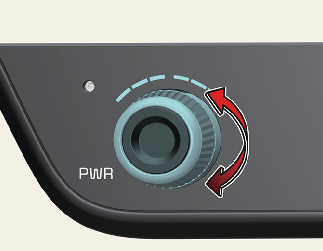
The temperature will increase to the maximum (HI) by rotating the knob clockwise direction.
The temperature will decrease to the minimum (Lo) by rotating the knob anti clock wise direction.
When rotating the knob, the temperature will increase or decrease by 0.5 °C. When set to the lowest temperature setting, the air conditioning will operate continuously.
Adjusting the driver and passenger side temperature equally

-
Press the "SYNC" button to adjust the driver and passenger side temperature equally.
The passenger side temperature will be set to the same temperature as the driver side temperature.
-
Turn the driver side temperature control knob. The driver and passenger side temperature will be adjusted equally.
-
If you rotate the passenger's temperature control knob, the SYNC button is turned off and the passenger side temperature can be operated individually.
Adjusting the driver and passenger side temperature individually
Press the "SYNC" button again to adjust the driver and passenger side temperature individually. The button indicator will turn off.
Changing temperature scale
You can switch the temperature mode from Centigrade to Fahrenheit as follows:
-
Go to 'Settings → Units → Temperature Unit' on the infotainment system.
The display will change from Centigrade to Fahrenheit, or from Fahrenheit to Centigrade. If the battery has been discharged or disconnected, the temperature mode display will reset to Centigrade.
For more details, refer to More Details.
Controlling air intake
This is used to select the outside (fresh) air position or recirculated air position.
To change the air intake control position:
-
Push the desired control button.
Recirculated air position
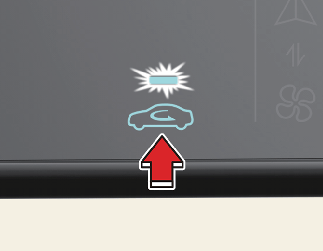
With the recirculated air position selected, air from the passenger compartment will be drawn through the heating system and heated or cooled according to the function selected.
Outside (fresh) air position

With the outside (fresh) air position selected, air enters the vehicle from outside and is heated or cooled according to the function selected.

Prolonged operation of the heater in the recirculated air position (without air conditioning selected) may cause fogging of the windshield and side windows and the air within the passenger compartment may become stale.
In addition, prolonged use of the air conditioning with the recirculated air position selected will result in excessively dry air in the passenger compartment.

-
Continued climate control system operation in the recirculated air position may allow humidity to increase inside the vehicle which may fog the glass and obscure visibility.
-
Do not sleep in a vehicle with the air conditioning or heating system on. It may cause serious harm or death due to a drop in the oxygen level and/or body temperature.
-
Continued climate control system operation in the recirculated air position can cause drowsiness or sleepiness, and loss of vehicle control. Set the air intake control to the outside (fresh) air position as much as possible while driving.
Controlling fan speed
The fan speed can be set to the desired speed by operating the fan speed control button.
To change the fan speed:
-
Press button right for higher speed, or press button left for lower speed.

To turn the fan speed control off:
-
Press the OFF button.
Air conditioning (A/C)

-
Press the A/C button to turn the air conditioning system on (indicator light will illuminate).
-
Press the button again to turn the air conditioning system off.
Turning off the front air climate control
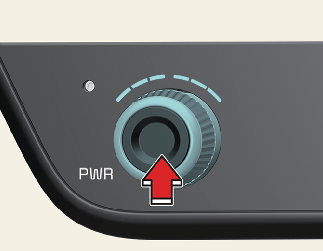
-
Press the OFF button to turn off the air climate control system.
However, you can still operate the mode and air intake buttons as long as the ENGINE START/STOP button is in the ON position.
Automatic air ventilation
When operating heater and air conditioner for the vehicle ventilation, if you maintain the Recirculation mode for 30 minutes or over at low temperature, it automatically changes to Fresh mode.
Automatic air ventilation control procedure
Auto dehumidify is activated when you select 'Settings → Vehicle → Climate → Automatic Ventilation → Auto dehumidify' from the Settings menu in the Infotainment System screen.
For more details, please scan the QR code in a separately supplied Car Infotainment System Quick Reference Guide.
A/C Automatic Drying (if equipped)
A/C Automatic Drying feature dries the moisture in the air conditioner and reduces air conditioner odor. The blower motor automatically operates after 30 minutes the vehicle is turned off.
Turning A/C Automatic Drying on or off
The A/C Automatic Drying feature can be turned on and off by selecting Setup → Climate → Climate Features → A/C Automatic Drying from the infotainment system.
If the operating condition is satisfied, a message Air Conditioning Automatic Drying will start in 30 minutes will be displayed on the infotainment/climate switchable controller screen and then the blower motor will automatically operate on schedule.
When the A/C Automatic Drying feature is activated, the air conditioner sets the fan speed to the third level, selects Fresh mode, and directs the air flow to the floor.
The infotainment system may change after software updates. For more information, refer to the user's manual provided in the infotainment system and the quick reference guide.
Operating conditions
The A/C Automatic Drying feature operates under the following conditions:
-
The vehicle is turned off after operating the air conditioner for a certain period
-
The 12-volt battery level is sufficient
-
The outside temperature is above a certain level
Non-operating conditions
The A/C Automatic Drying feature stops operating under the following conditions:
-
The A/C Automatic Drying feature has operated for 3 minutes
-
The EV button is pressed, or the vehicle is ON
-
The climate control system is operated remotely
-
The A/C Automatic Drying feature reduces air conditioner odors but may not remove all odors.
-
The A/C Automatic Drying feature does not operate if the remaining battery level is insufficient to prevent battery discharge.
Sunroof inside air recirculation (if equipped)
The outside (fresh) air position is automatically selected, when the sunroof is opened while operating the heating/air conditioning system.
When you select the recirculated air position, the system maintains the recirculated air position for 3 minutes and then automatically converts to the outside (fresh) air position.
When the sunroof is closed, the air intake position will return to the original position that was selected.
Activate upon washer fluid use
To prevent the odor from entering to inside the vehicle, the ventilation system changes to Recirculated Air Mode for a while when the windshield washer fluid sprayed. However, at low outside temperature, to prevent from windshield fogging, the system continues to outside air mode.
Go to 'Settings → Climate → Recirculate Air → Activate upon Washer Fluid Use' on the infotainment system.
For more details, please scan the QR code in a separately supplied Car Infotainment System Quick Reference Guide.
Recirculation mode plus (if equipped)
To prevent the inflow of polluted air indoors when passing through the tunnel and odor area, this function automatically switches the air conditioner to recirculation mode about 7 seconds before the vehicle enters the tunnel based on the map information of the navigation and the speed of the vehicle.
Operating Condition
-
Type of Road: Expressway,
-
Air Intake Condition: Fresh Mode
You may activate or deactivate this function from the Infotainment System as 'Settings → Vehicle → Climate → Recirculate Air → Recirculation Mode Plus'.
For more details, please scan the QR code in a separately supplied Car Infotainment System Quick Reference Guide.