
Setting and activating Blind-Spot Collision Warning/Blind-Spot Collision-Avoidance Assist
 ) several times on the steering wheel until 'User Settings' menu appears on the LCD.
 /
/  ) and the OK button on the steering wheel.
-
Active Assist: Blind-Spot Collision-Avoidance Assist and Blind-Spot Collision Warning turn on and get ready to be activated. Then, if a vehicle approaches the driver's blind spot area a warning sounds or braking power is applied if Blind-Spot Collision-Avoidance Assist is equipped.
-
Warning only: Blind-Spot Collision Warning turns on and gets ready to be activated. Then, if a vehicle approaches the driver's blind spot area only a warning sounds.
-
Off: Blind-Spot Collision Warning/Blind-Spot Collision-Avoidance Assist is deactivated and the indicator on Blind-Spot Safety button is extinguished.
-
If you press Blind-Spot Safety button while 'Active Assist' or 'Warning only' is selected the indicator on the button extinguishes and the function deactivates.
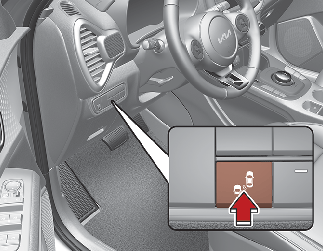
-
If you press Blind-Spot Safety button while the function is cancelled the indicator on the button illuminates and the function activates. In this case, the function returns to the state before the vehicle turned off. When the function is initially turned on and when the vehicle is turned off then on again while the function is in activation, the warning light will illuminate for 3 seconds on the outside rearview mirror.
-
If the vehicle is turned off then on again, the function maintains the previous state.