
Smart Cruise Control (SCC)
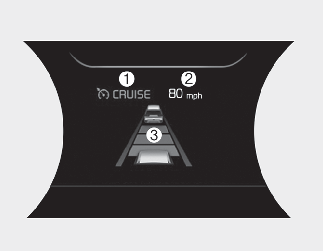
-
Cruise indicator
-
Set speed
-
Vehicle Distance

For your safety, please read the owner's manual before using Smart Cruise Control.

To activate Smart Cruise Control, depress the brake pedal at least once after turning the START/STOP button to the ON position or starting the vehicle. This is to check if the brake switch which is important part to cancel Smart Cruise Control is in normal condition.
Smart Cruise Control Limitations
Smart Cruise Control is a supplemental function and is not a substitute for safe driving practices. It is the responsibility of the driver to always check the speed and distance to the vehicle ahead.
-
If Smart Cruise Control is left on, (cruise indicator in the instrument cluster illuminated) can be activated unintentionally. Keep Smart Cruise Control off (cruise indicator off) when Smart Cruise Control is not being used.
-
Use only when traveling on open highways in good weather.
-
Do not use Smart Cruise Control when it may not be safe to keep the car at a constant speed. For instance.
-
Highway interchange and tollgate
-
Road surrounded by multiple steel constructions (subway construction, steel tunnel, etc)
-
Parking lot
-
Lanes beside guard rail on a road
-
Slippery road with rain, ice, or snow
-
Abrupt curved road
-
Steep hills
-
Windy roads
-
Off roads
-
Rods under construction
-
Rumble strip
-
When driving near crash barriers
-
When driving on a sharp curve
-
When the vehicle sensing ability decreases due to vehicle modification resulting level difference of the vehicle's front and rear
-
When driving in heavy traffic or when traffic conditions make it difficult to drive at a constant speed
-
Limited visibility (rain, snow, smog, etc.)
-
-
Pay particular attention to the driving conditions whenever using Smart Cruise Control.
-
Be careful when driving downhill using Smart Cruise Control.
-
Cruise function should not be used when the vehicle is being towed to prevent any damage.
-
Always set the vehicle speed under the speed limit in your country.
-
Always pay continuous attention to road and driving conditions even when Smart Cruise Control is being operated.
- Contains Topics
- Driving Assist button
- Setting Smart Cruise Control speed
- Increasing Smart Cruise Control set speed
- Decreasing Smart Cruise Control set speed
- Accelerating temporarily with Smart Cruise Control on
- Smart Cruise Control will be temporarily canceled when:
- Resuming Smart Cruise Control set speed
- Turning Smart Cruise Control off
- Setting Vehicle Distance
- Adjusting the sensitivity of Smart Cruise Control
- Converting to Cruise Control mode
- Limitations of Smart Cruise Control
- This device complies with Part 15 of the FCC rules.
- Radio frequency radiation exposure information:
- Leading Vehicle Departure Alert