
Trickle Charge
How to Connect Portable Charging Cable (ICCB: In-Cable Control Box) (Type A)
-
Connect the plug to a household electric outlet.
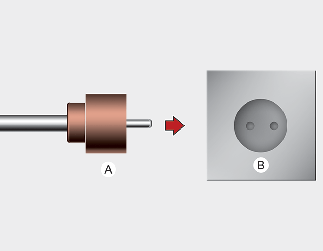
A: Plug
B: Electric Outlet

If the outlet is aged, damaged or cracked, do not use it.
-
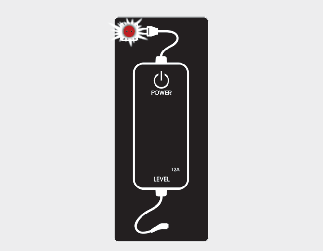
Check if the power lamp (green) on the control box turns ON.
-
While the brake pedal is pressed, engage the parking brake.
-
Turn OFF all switches, place the shift lever in P (Park). If you try to charge while the shift lever is not placed in P (Park), it will automatically move to P (Park).
However, charge the battery only when the shift lever is placed in P for safety reasons.
* Make sure that the plug is not loosely put into the outlet. (If it is loose, it may generate heat.)
-
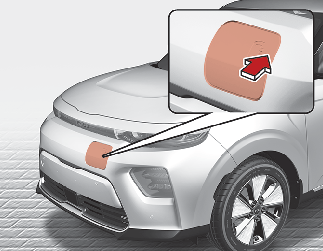
Open the charging door by pressing the icon of the charging door. The charging door will not open if the vehicle door is locked.
 CAUTION
If you cannot open the charging door due to freezing weather, tap lightly or remove any ice near the charging door. Do not try to forcibly open the charging door.
If you open it by force, the charging door may be damaged.
CAUTIONIn order to connect the charging connector, release the door lock to unlatch the charging connector lock system.
If not, the charging connector and the vehicle's charging inlet may be damaged.
 NOTICE
The Charging Door will unlock when Driver's door is unlocked
To unlock Charging Door:
-
Press the unlock button on your smart key
-
Press the Central Door unlock button on armrest trim of driver's door
-
Pull the driver's inside door handle outward
To lock Charging Door:
-
Press the lock button on your smart key
-
Press the Central Door lock button on armrest trim of driver's door
* All doors will automatically lock after the vehicle speed exceeds 15km/h(9.3 mph)
Charging Door is also locked when vehicle speed exceeds 15km/h(9.3 mph)
-
-
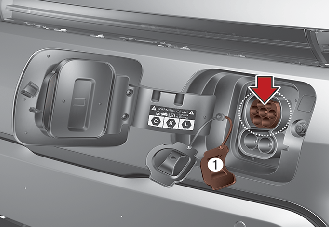
Open the charging door and then open the inlet cover(1).
-
Open the protective cover of the charging connector and check if there is dust on the charging connector and charging inlet.
-
Hold the charging connector handle and connect it to the vehicle AC charging inlet. Push the connector until you hear a "clicking" sound. If the charging connector and charging terminal are not connected properly, this may cause a fire.
* Charging Connector AC Charging Connector Locking Mode
When the charging connector and the charging inlet are connected, you can choose the mode by pressing button. The charging connector will be locked at a different time depending on the selected mode.
Always Mode: When the charging connector is properly connected, the charging connector will be automatically locked.
While charging Mode: When the charging connector is properly connected and charging is initiated, the charging connector will be locked.
For more information, refer to More Details.
-
Charging starts automatically and the charging indicator lamp starts to blink.
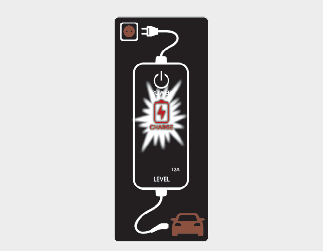
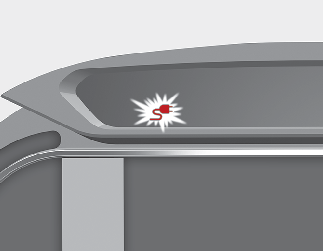
-
Check if the charge indicator lamp of the high voltage battery in the instrument cluster is turned ON. Charging does not occur when the charging indicator lamp is OFF.
When the charging connector is not connected properly, reconnect the charging cable to charge it again.
CAUTION-
You can start charging when the START/STOP button is in the OFF position and the shift lever is in P (Park).
After charging has started, you can use electrical components such as the radio by pressing the START/STOP button to ACC or ON position.
-
If you move the shift lever from P (Park) to R (Reverse), N (Neutral), D (Drive), charging stops immediately. If you want to start charging again, place the shift lever to P (Park) and press the START/STOP button to the OFF position. Unplug and reconnect the charging cable to start charging again.
-
-
After charging has started, the estimated charging time is displayed on the instrument cluster for about 1 minute.
If you open the driver seat door while charging, the estimated charging time is also displayed on the instrument cluster for about 1 minute.
When reserved charging is set, the estimated charging time is displayed as "--" .
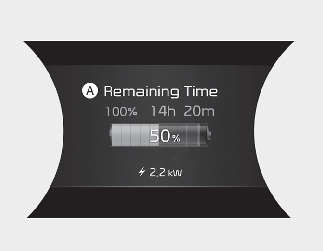
A: Remaining Time
Depending on the condition and durability of the high voltage battery, charger specifications, and ambient temperature, the time required for charging the battery may vary.
In order to disconnect the charging connector, release the door lock to unlatch the charging connector lock system.
If not, the charging connector and the vehicle's charging inlet may be damaged.
How to Connect Portable Charging Cable (ICCB: In-Cable Control Box) (Type B)
-
Connect the plug to a household electric outlet.
A: Plug
B: Electric Outlet
If the outlet is aged, damaged or cracked, do not use it.
-
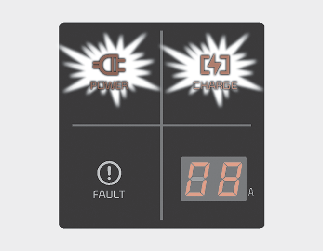
Check if the power lamp (green) appears on the control box.
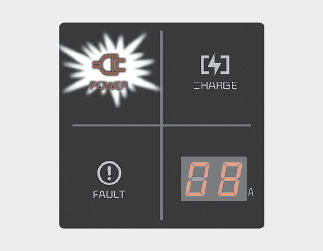
-
Depress the brake pedal and apply the parking brake.
-
Turn OFF all switches, place the shift lever in P (Park). If you try to charge while the shift lever is not placed in P (Park), it will automatically move to P (Park).
However, charge the battery only when the shift lever is placed in P for safety reasons.
* Make sure that the plug is not loosely put into the outlet. (If it is loose, it may generate heat.)
-
Open the charging door by pressing the icon of the charging door. The charging door will not open if the vehicle door is locked.
CAUTIONIf you cannot open the charging door due to freezing weather, tap lightly or remove any ice near the charging door. Do not try to forcibly open the charging door.
If you open it by force, the charging door may be damaged.
CAUTIONIn order to connect the charging connector, release the door lock to unlatch the charging connector lock system.
If not, the charging connector and the vehicle's charging inlet may be damaged.
NOTICEThe Charging Door will unlock when Driver's door is unlocked
To unlock Charging Door:
-
Press the unlock button on your smart key
-
Press the Central Door unlock button on armrest trim of driver's door
-
Pull the driver's inside door handle outward
The Charging Door will lock when all doors are lockedTo lock Charging Door:
-
Press the lock button on your smart key
-
Press the Central Door lock button on armrest trim of driver's door
* All doors will automatically lock after the vehicle speed exceeds 15km/h(9.3 mph)
Charging Door is also locked when vehicle speed exceeds 15km/h(9.3 mph)
-
-
Open the charging door and then open the inlet cover(1).
-
Open the protective cover of the charging connector and check if there is dust on the charging connector and charging inlet.
-
Hold the charging connector handle and connect it to the vehicle AC charging inlet. Push the connector until you hear a "clicking" sound. If the charging connector and charging terminal are not connected properly, this may cause a fire.
* Charging Connector AC Charging Connector Locking Mode
When the charging connector and the charging inlet are connected, you can choose the mode by pressing button. The charging connector will be locked at a different time depending on the selected mode.
Always Mode: When the charging connector is properly connected, the charging connector will be automatically locked.
While charging Mode: When the charging connector is properly connected and charging is initiated, the charging connector will be locked.
For more information, refer to More Details.
-
Charging starts automatically (charging lamp appears).
-
Check if the charge indicator lamp of the high voltage battery in the instrument cluster is turned ON. Charging does not occur when the charging indicator lamp is OFF.
When the charging connector is not connected properly, reconnect the charging cable to charge it again.
CAUTION-
You can start charging when the START/STOP button is in the OFF position and the shift lever is in P (Park).
After charging has started, you can use electrical components such as the radio by pressing the START/STOP button to ACC or ON position.
-
If you move the shift lever from P (Park) to R (Reverse), N (Neutral), D (Drive), charging stops immediately. If you want to start charging again, place the shift lever to P (Park) and press the START/STOP button to the OFF position. Unplug and reconnect the charging cable to start charging again.
-
-
After charging has started, the estimated charging time is displayed on the instrument cluster for about 1 minute.
If you open the driver seat door while charging, the estimated charging time is also displayed on the instrument cluster for about 1 minute.
When reserved charging is set, the estimated charging time is displayed as "--" .
A: Remaining Time
Depending on the condition and durability of the high voltage battery, charger specifications, and ambient temperature, the time required for charging the battery may vary.
In order to disconnect the charging connector, release the door lock to unlatch the charging connector lock system.
If not, the charging connector and the vehicle's charging inlet may be damaged.