

EV button
Whenever the front door is opened, the EV button will appear for your convenience.
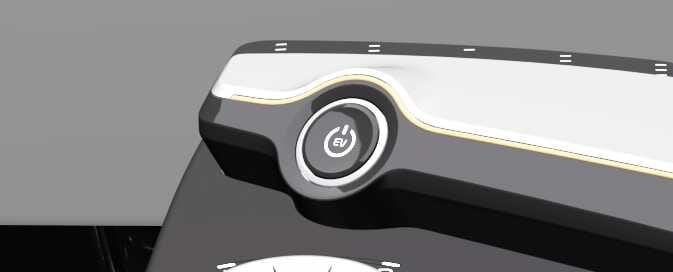 OCV051001L |
The light will go off after about 30 seconds when the door is closed.
When all doors are closed, if you lock the vehicle by using the transmitter or the smart key, the light turn-off immediately.
EV button position
The EV button has the following four positions.
-
OFF
-
POWER ON
-
DRIVE READY
To turn off the vehicle power (DRIVE READY or POWER ON), press the EV button with the shifter dial in the P (Park) position.
Press the EV button once without depressing the brake pedal. The warning lights can be checked before the vehicle is started.
Some of the electrical accessories are usable.
In 14 minutes after POWER ON, the infotainment system screen shows the below. To continue to use the vehicle power, press ‘Start Utility Mode’
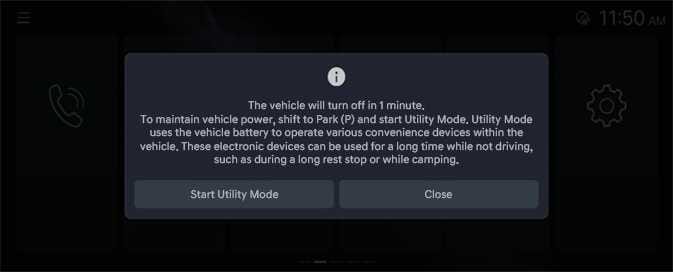 OCV034128L |
If POWER ON is maintained for 15 minutes without converting to the utility mode, the power is turned OFF.
If the high-voltage battery charging and outdoor V2L features are used with POWER ON, the power is not turned OFF.
To start the vehicle in OFF or POWER ON state, depress the brake pedal and press the EV button with the shifter dial in the P (Park) position.
If you press the EV button without depressing the brake pedal, the vehicle will not start and the EV button changes as follows:
Starting Vehicle
Never press the EV button while the vehicle is in motion except in an emergency. This would result in loss of directional control and braking function, which could cause an accident.
Leaving the Vehicle
To avoid unexpected or sudden vehicle movement, never leave your vehicle if the vehicle is not locked in the P (Park) position and the parking brake is fully engaged. Before leaving the driver’s seat, always make sure the vehicle is engaged in P (Park), set the parking brake fully and shut the vehicle off.