

DRIVE MODE
You may select the drive mode according to preference or road condition.
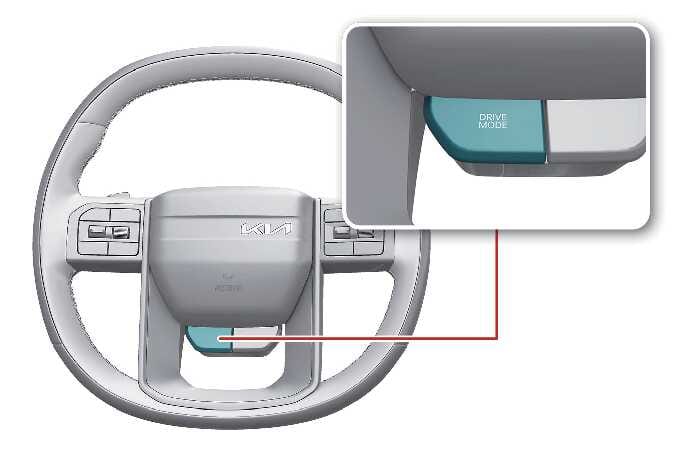 N_SP3i26_C09_025_1_I |
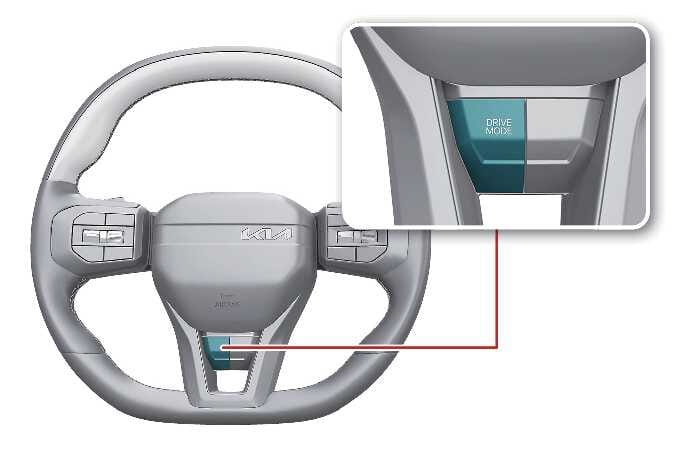 N_SP3i25_C09_024_1_IR |
-
Press the DRIVE MODE button. The drive mode changes whenever you press the button.
-
DRIVE MODE will change to NORMAL mode when the vehicle is restarted.
-
Depending on the region, the vehicle switches to NORMAL mode upon restart.
|
DRIVE MODE |
Characteristics |
|---|---|
|
NORMAL |
Provides smooth driving and a comfortable ride. |
|
SPORT |
Provides sporty riding. |
|
MY DRIVE |
Appropriately distributes traction forces and prevents wheel slippage when you drive on snowy or slippery roads. |
|
SNOW |
DRIVE MODE selectable for each preferred component within the theme system. |
NORMAL mode
NORMAL mode provides smooth driving and comfortable riding.
SPORT mode
SPORT mode manages driving dynamics to enhance driver performance by automatically adjusting the steering effort, engine, and transmission control logic.
-
When SPORT mode is activated, the indicator appears on the instrument cluster.
-
The drive mode defaults to NORMAL when you restart the engine. If you want to use SPORT mode, press the DRIVE MODE button to select SPORT mode.
-
When SPORT mode is activated:
-
Engine speed (rpm) tends to remain raised over a certain amount of time, even after releasing the accelerator pedal.
-
Upshifts are delayed when you accelerate.
-
Fuel efficiency may decrease when you drive in SPORT mode.
MY DRIVE mode
In MY DRIVE mode, the driver can select separate modes and combine them on the infotainment system screen.
To set MY DRIVE mode, select from the infotainment system.
|
Adjust |
MY DRIVE MODE |
|---|---|
|
Powertrain |
ECO/NORMAL/SPORT/SMART |
|
Steering |
NORMAL/SPORT |
The infotainment system may change after software updates. For more information, refer to the manual provided in the infotainment system and the quick reference guide.