

EV button
Your vehicle is equipped with 2 different positions.
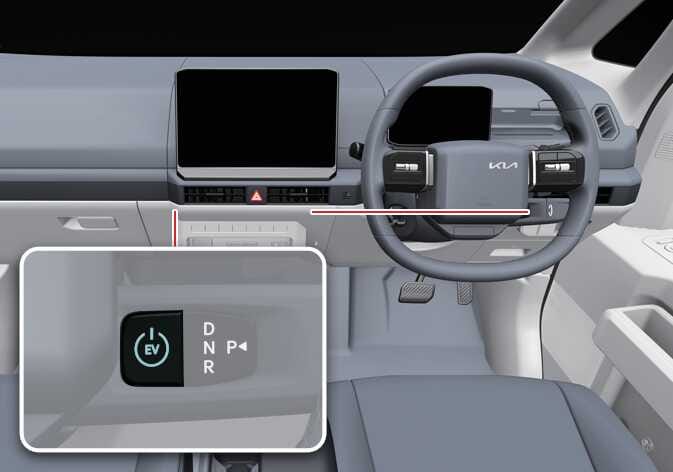 OSW045019R |
OFF
Press the EV button with the vehicle in P (Park) to turn off the vehicle.
-
In an emergency situation whilst the vehicle is in motion, press the EV button for more than approximately 2 seconds or 3 times repeatedly within 3 seconds to turn the vehicle off.
-
If the vehicle is still moving, press EV button when the vehicle is over 5 km/h (3 mph) to restart the vehicle.
You are able to turn off the vehicle only when the vehicle is not in motion.
POWER ON
Press the EV button twice without depressing the brake pedal.
-
When 14 minutes have passed since the vehicle is in POWER ON position, a pop-up appears on the infotainment screen. To continue using vehicle power, select Start Utility Mode on the infotainment screen.
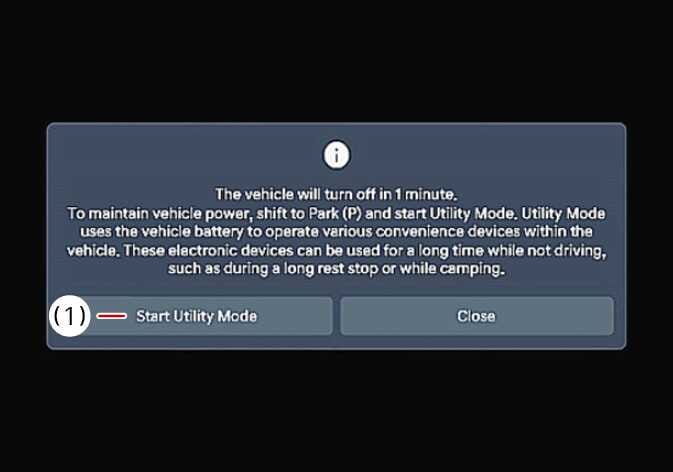 N_CT25Z158_E
-
Start Utility Mode
-
-
If the POWER ON position is maintained for approximately 15 minutes without switching to utility mode, the vehicle will automatically turn off.
-
If high-voltage battery charging or the outdoor V2L feature is used with the POWER ON position, utility mode is activated and the vehicle will not turn off.
-
The infotainment system may be updated. For more details, refer to Drive mode integrated control system.
DRIVE READY
When the vehicle is in OFF or POWER ON position, press the EV button whilst depressing the brake pedal in P (Park).
-
Never press the EV button whilst the vehicle is in motion. This would result in loss of directional control and braking function, which could cause an accident.
-
Before leaving the driver's seat, always make sure the vehicle is in P (Park), set the parking brake fully and turn the vehicle off. Unexpected and sudden vehicle movement may occur if these precautions are not taken.
-
Never reach for the EV button or any other controls through the steering wheel whilst the vehicle is in motion. The presence of your hand or arm in the area could cause loss of vehicle control, an accident and serious bodily injury or death.
-
Do not place any movable objects around the driver's seat as they may move whilst driving, interfere with the driver and lead to an accident.
Anti-theft steering column lock: (if equipped)
-
The steering wheel locks in the OFF position to help prevent theft.
-
The steering wheel locks when the driver’s door is opened.
-
If the steering wheel does not lock properly when the driver’s door is opened, a warning chime will sound. Attempt to lock the steering wheel again.
-
If the issue persists, have the vehicle inspected by a professional workshop. Kia recommends that you visit an authorised Kia dealer/service partner.
-
If the vehicle is in the OFF position and the driver’s door is already open, the steering wheel will not lock and a warning chime will sound. In this case, close the door to lock the steering wheel and stop the chime.
If the steering wheel doesn't unlock properly, the EV button will not work. Press the EV button whilst turning the steering wheel right and left to release the tension.